


Editor's review
Wonder Photo Studio 2.5 is a layer-based digital image manipulation software that is basically intended to allow the users express their artistic creativity through the medium of digital collages.
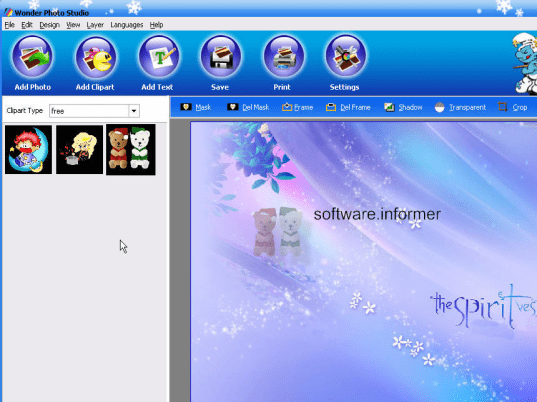
Wonder Photo Studio provides somewhat ‘Photoshop’ like utility but in a much precise, less complicated manner. The top portion of the interface contains six attractive, round and animated buttons that have been captioned ‘Add Photo’, ‘Add clip art’, ’Add Text’, ‘Save’, ‘Print’ and ‘Settings’ in that order. These buttons explain the most features of the software in themselves. ‘Add’ buttons can be used to browse the desired locations and when reached snapshots of the images(*.jpeg, *.bmp, *.gif, *.png, *jpg) appear on the bottom left corner of the interface. These snapshots then need to be dragged and dropped onto the right hand canvas that provides various options to mask, frame, crop, shadow and adjust transparency of the currently selected image layer. This sequence of actions needs to be iterated until the final artwork is obtained. Windows Photo Studio also provides facilities for background settings, pixel width settings, image cropping, flipping and zooming. Software also has compatibility with all the commonly used image file formats and also performs an automatic integration on save. Thus user can drag and drop any thumbnail without worrying about their dot extensions.
This is an ideal software for users who love to express their emotions through collages. Varying transparencies, masking special effects, borders and frames, shadows are often the features that are loved by these folks of users and this software allows them to reap them to the fullest! Users could also create visiting cards, wallpapers, calendars and so on. Wonder Photo Studio provides 300+ resources in form of templates, masks, frames, cliparts etc. Maximum file size allowed is 4200*4200 pixels. The menus provide same functionalities as that of the icons.
Requires extensive exploration and an experienced user. When dropped, images added to the canvas are cropped circular by default.
Overall: Good utility software overall. Boosts creativity that’s worth of 15 MB disk space. Rated 3 stars.
User comments