


Editor's review
Looking for powerful conversion utility that supports conversion from the images to PDF files? No need to search more as you may just find PhotoPDF Photo to PDF Convertor 2.1.7 good enough to suit this need. It supports easy conversion with different modes that can be used by you according to your requirements. The software also supports the customization for settings of the pages and conversion methods. It allows you to effortlessly set all the images either on a single page altogether or placed individually as you choose it to be.
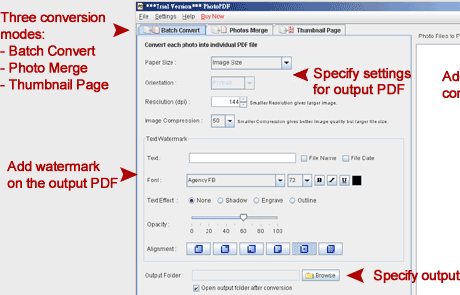
The screen of the software has been planned in a simple manner to give an interface that is intuitive to use. To begin with processing done you first need to have the images selected and added to the program. The selected pictures are shown on the right side of the screen. When have made the selection for the images you then need to select the process mode to be Batch Convert or Photos Merge. With the ‘Batch Convert’ method you can convert the images in batch, into individual PDF files. ‘Photos Merge’ merges the multiple images into single PDF file. There also is a feature ‘Thumbnail Page’ to generate the images. You can set the Paper Size, Orientation, and resolution for the output file. Make the selection of the output folder for saving the output file. To make the file protected you can have the watermark placed on it. You can place text or choose the filename or date for the watermark and also set the customization features like opacity, alignment, etc. When you’re done with the selection you can get the file converted to PDF maintaining the best possible quality.
PhotoPDF Photo to PDF Convertor 2.1.7 is capable of converting images to PDF in appreciably less amount of time which helps it receive a score of 4 points. It well thought out features which enable for better grip on the output also keeps it in good stead.
User comments