
Free Downloads Center
e.g. 2D Viewer & Editor: DWG DXF PLT TIFF CGM 7

Categories

Latest Reviews

MediaMonkey

MediaMonkey
MediaMonkey is an all in one music manager and jukebox for music lovers to keep their collection more organized and flexible.

Smart Desktop Calendar Pro

Smart Desktop Calendar Pro
Smart Desktop Calendar Pro, the smart and customizable tool that provides a fully customizable personal calendar for your desktop.

Subscribe

2D Viewer & Editor: DWG DXF PLT TIFF CGM 7 Download

Editor's rating  
Users' rating   (2 votes) Rate it!
License Shareware / $76
Downloads 13836
Publisher CADSoftTools
File size 7798K
Date added 4-Feb-2009
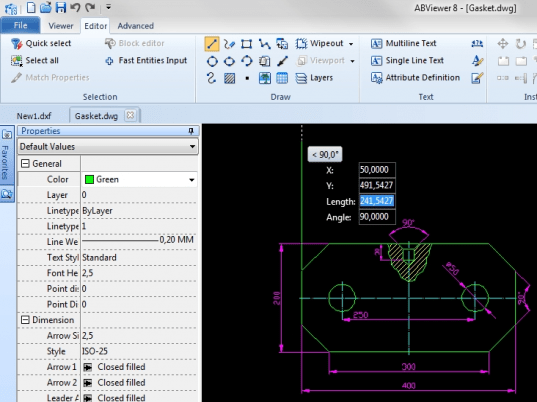
2D Viewer & Editor: DWG DXF PLT TIFF CGM screenshot

Enlarge screenshot

Publisher's description
Editor's review
Submit your review

ABViewer is a high-quality, cost-efficient multi-functional design and engineering document management application. ABViewer offers you a wide choice of professional viewing and editing tools. Support of more than 30 both raster and vector formats is provided, including AutoCAD DWG, DXF, DWF, Hewlett-Packard HPGL, PLT, HGL, CGM, SVG, TIFF, BMP, JPG, GIF etc

Key features:

Editing Drawings:

ABViewer allows editing both standard CAD formats such as DWG and DXF and vector files: PLT, SVG, CGM. The application provides all the professional editor tools and gives the possibility for performing all the operations supported by "heavy editors" which are usually used for design work.

Conversion Features:

Copying to the clipboard as BMP, EMF/WMF.
Exporting drawings to raster formats BMP, JPEG, GIF, TIFF with the possibility of additional settings.
Saving data vector when exporting to the vector files: PDF, DXF, PLT, SVG, CGM, SWF, WMF, EMF.
Important: Clip Rectangle allows you to convert only the selected part of the drawing.

Measure Tools:

Quick and easy setting of scale factor for measurements - no more additional computations!
Changing lengths, areas and perimeters.

File Search:

Favorites and Explorer panels give the possibility for fast navigation among files. Thumbnails subprogramme allows one to view all files in a catalogue before they are opened, including DXF, PLT and other files not managed by Windows or ordinary viewers. Thanks to the up-to-date tab-based document structure you can very quickly navigate among files.

Redline mode:

Redline commentaries to the drawing provide additional information which is "applied" onto the drawing but which doesn't change the basic file. All editing elements are at your disposal in this mode. Your commentaries and remarks together with the basic file can be printed or converted to another format.

ABViewer7 is your best solution for editing industrial drawings job.

Editor review: Reviewer, 2008-05-28 07:15:00

Application can view and edit a large range of formats DWG, DXF, HPGL, TIFF, SVG, CGM, EMF/WMF, JPG, JPEG, GIF, PCX, BMP, etc. Print System allows you to print large drawings on multiple sheets. Clip Rectangle copies to clipboard as BMP and EMF. Export to TIFF, BMP, WMF, GIF, JPEG.

Pros: ABViewer is a multi-purpose viewer and converter. ABViewer supports DWG (2.5 - 2007/2008), DXF, TIFF, SVG, CGM, HGL, PLT, SPL, HG, HPG, PLO, PCX, BMP, JPG, JPEG, WMF formats. For collaboration in a team not everyone needs a full fledged AutoCAD, many of the members need only to view and redline the drawings for which this application alone would be a very cost effective solution. Conversion between many formats is also supported. ABViewer converts all supported files to BMP, EMF, JPEG, GIF, TIFF formats. Image manipulations such as drag images, zoom in, zoom out, centering, printing including advanced printing allows you to print one image to many sheets of paper as "tiles" to glue together afterwards.

The important function of redlining is supported by following operations for optimum collaboration. Adding and deleting of entities like text, line/poly-line, arrow, arbitrary line, rectangle, ellipse, Arc dimensions and hatching are available. Changing of colors, dragging of entities, show/ hide of redlines, creating, saving, loading and editing of redline markup along with show/hide of the grid makes the redlining very effective. These are further supported by specifying redlining path for storing redline markup files, x, y spacing on grid properties and loading of redline mark ups automatically.

Clip rectangle allows a lot of flexibility in focusing into specific areas of the drawings supported by printing of course. Copying onto clipboard for use in other applications also is possible. Coupled with batch conversion operations and ability to change settings such as line colors and line widths etc provides the necessary flexibility in production environments.

Cons: Before adopting it into production environment one should check out compatibility with the many versions of DWG/DXF generated in AutoCAD environment. User feedback may be the quickest way together this data.

Overall: Nice set of features have been included, works in familiar environment of the user group. This certainly is at 4 star level.

Visit homepage of 2D Viewer & Editor: DWG DXF PLT TIFF CGM

Download 2D Viewer & Editor: DWG DXF PLT TIFF CGM 7


plt format
gif to cgm
emf files
edit dxf
convert dwg to wmf
bmp to jpeg converter
eps to svg
hpgl to tiff
jpg to hpgl
paper to dxf

Programs related to 2D Viewer & Editor: DWG DXF PLT TIFF CGM

Copyright © 2001-2009, Free Downloads Center.