
 |
 |
|
|
 |
 |
 |
 |
|
|
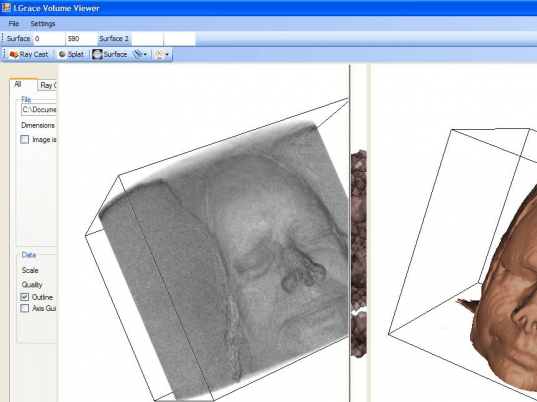
Volume visualization of several 3D data set types (Raw images, .VTK, and DICOM/MRI files) using
* Ray-Cast
* Slatting
* Iso-Surfaces
* Save files as JPEG or PNG
* Visualizes 3 images at one time for comparison. Requires the visualiztion toolkit to run.
|
|
Editor review: Reviewer, 2008-08-25 08:50:00
This tool is a medical file image viewer for reviewing medical images as 3D rendered objects (e.g. CT-Scans, MRI, etc.).
Pros: The main feature of the application is Volume visualization of several 3D data set types (Raw images, .VTK, and DICOM/MRI files). You can save files in JPEG or PNG formats and visualize 2 images at one time for comparison. You can customize the visualization using the following 3 features:
(1) Ray Cast: With this feature you can choose between compressed and uncompressed Data. This feature also allows you to choose between Linear or Nearest Neighbor Interpolation, and specify the Ray Casting Method (MIP, Composite, and Surface). You can choose between 2D and 3D hardware texture mapping and specify the color and opacity of up to 10 points using the via color transfer functions. The tool can automatically distribute points and opacity based on file dimensions and automatically generates grey-scale and color.
(2) Splat: With this feature you can specify the splat radius and sample rate. The tool allows you to generate points by scalar method. You can choose between compressed and uncompressed data and generate a generic splat but only at the basic setup.
(3) ISO-Surface: With this feature you can create 2 simple ISO-Surfaces which can be generated via a triangle stripper. The tool also allows you to generate a contour from a range of points and specify the color, location, and opacity of the two ISO-Surfaces.
The tool in its implementation provides you with multi-file support (vtk, raw single and raw multi-set images), pre-instantiated object references to increase speed, object switches to manage various rendering mappers and shortcuts for creating surface, point, and opacity parameters.
Cons: The application is still in Beta version and problems are to be expected.
Overall: This tool surely is a great help for reviewing the medical images in 3D rendered objects giving more clarity and information of the views. A overall rating of very good at 3 stars.
|
 |
 |
Visit homepage of Medical Volume Viewer
Download Medical Volume Viewer 1
Popular search terms related to Medical Volume Viewer:
medical, iso, image viewer, png, volume, jpeg, viewer, run, image, save
|

iso cd image what is an iso file file to iso file iso what is iso file files to iso what are iso files iso files raw to jpeg image iso

Programs related to Medical Volume Viewer
PLT Viewer : Your Best Solution for Arranging PLT Files!
Managing PLT files is one of most important features of PLT Viewer, which also support other...
Scrapbooking Made Easy
Create layouts with your own photos and elements from your digital scrapbooking supplies. With Photo Editor 2008, you have ful...
Create professional slide shows without any trade-offs for DVD and PC. Rotate pictures, collages, particles and texts, set transitions and zoom effect...
Quickly and easily order your photos with the MediaImpression Order Photo Gifts and Prints feature. Select your photos and get creative with them by ...
ArcSoft RAW Thumbnail Viewer allows you to preview your RAW photos when browsing through your files. In the ˇ°Thumbnailsˇ± view of Windows Explorer, R...
Ashampoo Photo Commander 7 is an all-in-one application for organizing, editing, sharing and presenting photo collections with additional audio and vi...
3D software for visualization of 3D models in VRML, X3D and Collada
BS Contact 7.2 enables the visualization of applications in Virtual Reality and A...
CactusView is an image viewer that has the following features:
Save to many many many formats e.g.(jpg, jp2, j2k, j2c, jpe, tif, pcx, png, bmp, tga, ...
Coly Photo Viewer is a fast, easy-to-use photo viewer, editor and convertor. It supports all major formats and has many features. Features include: ph...
Sure, you've seen your photos, but you've never seen your photos like this. Those of you who are used to viewing your photos as thumbnails in Windows ...
|