

Free Downloads Center
e.g. Photo Gadget Viewer 2.0

Latest Reviews

Animated Wallpaper Maker

Animated Wallpaper Maker
Add life to your desktop, decorate it with self created animation wallpapers with the help of Animated Wallpaper Maker.

Pimero Free Edition

Pimero Free Edition
Pimero Free Edition, perfect for private use this program will manage and organize all your personal information, appointments, emails, contacts, tasks and notes.

Subscribe

Photo Gadget Viewer 2.0 Download

Editor's rating  
Users' rating   (3 votes) Rate it!
License Freeware / $
Downloads 26710
Publisher XemiComputers Ltd.
File size 864K
Date added 6-Dec-2007
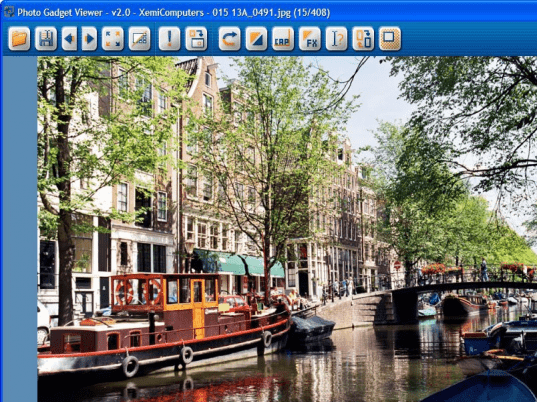
Photo Gadget Viewer screenshot

Enlarge screenshot

Publisher's description
Editor's review
Users' reviews (1)
Submit your review

Photo Gadget Viewer is a free to use program for Windows made for browsing through digital photos. It is fast in opening a photo file and offers standard keyboard shortcuts to look at other photos available in the same folder. Mouse wheel works for navigation, too. Thumbnails view shows all photos in the current folder and to get to a single-photo full screen view simply double click on it. Auto-rotate option based on EXIF is enabled by default. If you open a selection of several photos the program will browse only through that selection. Photo Gadget Viewer can sort photo files by name, date or size and includes an option to open a photo with an external program. You can use Save As option to make a copy of a photo or convert it to a different file format. In the settings dialog you can select photo file extensions that you want to be associated with the program so that it opens those files directly on double click. Supported formats include JPG, BMP, TIFF, PNG, PCX, and TGA.

Editor review: Reviewer, 2007-07-13 06:39:00

With digital images proliferating our computer we at times require software that allows us effortlessly glance through them. Photo gadget viewer is small piece of software that does this job in a neat manner. Although the viewer lacks editing capabilities that are available in the professional (Pro) version; it still is a useful utility.

The software has a smooth installation and can run easily on old systems. In case you are using an older version of Windows operating system which lacks the current image viewing options that come with the XP or Vista then you may take a liking to this software. The software has a nice blue default screen where you select any image. Move across the work area is smooth and images are easily placed in the viewer. Then via the use of keys you can all images present in that folder. The full feature though very basic may still appeal to some user due to its neat execution. Most of the common image formats are supported. It has useful features to sort images by name, date and even by their size. You can also try associating program with image files so that they open by default in Photo gadget viewer. However making association would be helpful only if you have the pro version.

On the downside the software is bit basic to for users with Windows Vista. It ideally should include features like 3D view and layered views. Though the Pro version is quite equipped to handle a number of tasks, this basic version has limitations that reduce its appeal. Overall the Photo gadget viewer is recommended for people who are running older versions of operating systems that lack good image viewing capabilities. For most people choosing the Professional edition of this software would be a good option.

Visit homepage of Photo Gadget Viewer

Download Photo Gadget Viewer 2.0


how to open pcx file
exif viewer
photo auto editor
tga picture viewer
photo date sort
time photo
take photo convert text
works viewer
photo clean
insert photo into another

Programs related to Photo Gadget Viewer

Copyright © 2001-2009, Free Downloads Center.