
Free Downloads Center
e.g. Picture Information Extractor 5.34

Latest Reviews

AlphaEZCam

AlphaEZCam
AlphaEZCam is a fully functional webcam application that has the capability to manage multiple cameras and upload images to web servers.

AirGrab WiFi Radar

AirGrab WiFi Radar
AirGrab WiFi Radar is a highly efficient tool for displaying and providing you access to the Apple Airport base stations and other WiFi wireless access points.

Subscribe

Picture Information Extractor 5.34 Download

Editor's rating  
Users' rating   (2 votes) Rate it!
License / $35
Downloads 3038
Publisher Picmeta Systems
File size 3959K
Date added 15-Oct-2009
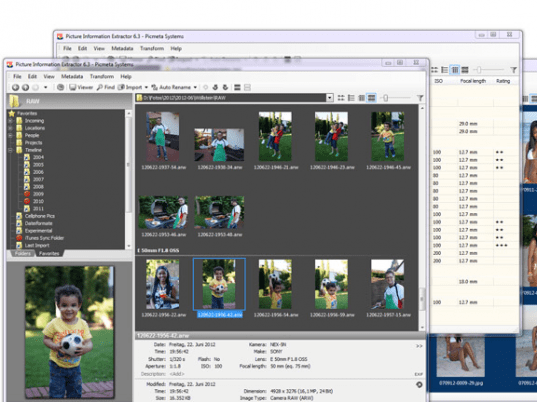
Picture Information Extractor screenshot

Enlarge screenshot

Publisher's description
Editor's review
Submit your review

The deluxe photo data toolkit for amateur photographers and professionals alike.

PIE is an image browser and viewer with perfectly integrated photo metadata and file renaming features. It extracts EXIF, XMP and IPTC information from JPG and RAW files and makes it available in a convenient and welcoming interface.
One part of the metadata is standardized and contains information such as date and time the picture was taken, shutter speed and aperture etc. But a lot of information such as program mode, white balance settings or lens data, is stored in the Makernote block, which is proprietary and can usually only be read with special software from the camera maker. PIE, however, contains the most extensive Makernote database on the market.

Feature Highlights:
* Edit EXIF and IPTC metadata, add or delete tags, change date picture taken, lossless rotate and update embedded thumbnails, in single file and batch mode
* Geotagging of photos with interactive map
* Automatically rename picture files keyed to the date and time as well as other photo information, handled by a filename mask which can be customized easily.
* Quick batch change of capture date/time, works with JPG and RAW formats.
* Complete metadata headers can be saved and restored, as well as removed from the pictures.
* Allows to remove EXIF, IPTC and/or Adobe XMP headers from JPG-files.
* Very comfortable picture file manager. Move, copy, delete and rename picture files.
* Fast integrated picture viewer, naturally with image preloading, zooming and panning, as well as slide show features.
* Best way to download from memory card to your computer. It automatically creates a folder structure, moves or copies photos and videos, renames them as defined in the filename mask, and rotates photos taken in portrait mode.

Support for Sony .ARW .SR2, Canon .CRW .CR2, Adobe .DNG, Epson .ERF, Kodak .DCR .KDC, Mamiya .MEF, Minolta .MRW, Nikon .NEF, Olympus .ORF, Pentax .PEF, Fuji .RAF, Generic .RAW.

Editor review: Reviewer, 2008-12-08 08:05:00

The original EXIF toolkit. Photo browser that extracts metadata from JPG and RAW, transfers pictures from digital cameras, renames automatically, lossless rotates. It includes a file manager and fast picture viewer with slide show feature.

Pros: EXIF data supplied by most digital cameras provides a lot of useful information that could be useful to amateur as well as professional photographs. The PIE application has a picture browser, photo metadata extractor and file renaming feature. It uses the EXIF information from cameras and the JPG as well as RAW format pictures. You could edit the metadata, add/delete tags, change the EXIF date/time, do lossless rotates and update the embedded thumbnails without damaging Makernote data. Part of the EXIF header is standardized and contains information such as date and time the picture was taken, shutter speed and aperture and if the flash was used. A proprietary block in the set of information called the Makernote block can hold a lot of information. This extractor can get information out of the Makernote block. With this one single tool, you can review pictures with all the metadata from almost any camera. Date and time extracted can be utilized by the utility to rename photos. It can use other photo information along with a filename mask. This mask can be customized easily. Change date/time as a batch change and works with JPG and RAW formats. The application helps you save, modify or remove altogether the headers of metadata. You could remove Adobe XMP metadata too. Upload photos from cameras easily. Move photos and videos, rename them if required and get the portraits straightened. The integrated viewer lets you view the images, preload, zoom and pan and slideshows. Similarly the built in file manager lets you move, copy, delete and rename pictures. Support for Sony .ARW .SR2, Canon .CRW .CR2, Adobe .DNG, Epson .ERF, Kodak .DCR .KDC, Mamiya .MEF, Minolta .MRW, Nikon .NEF, Olympus .ORF, Pentax .PEF, Fuji .RAF, Generic .RAW formats.

Cons: Since there’re such a variety of cameras there could be formats where there could be glitches, but we did not find any.

Overall this feature rich application is at least a 4 star item.

Visit homepage of Picture Information Extractor

Download Picture Information Extractor 5.34


windows manager picture
exif jpg
file metadata
picture copy
exif tool
rename filename
add date to picture
web camera viewer
pictures manager
fast digital ripper

Programs related to Picture Information Extractor

Copyright © 2001-2009, Free Downloads Center.