
 |
 |
|
|
 |
 |
 |
 |
|
|
Sure, you've seen your photos, but you've never seen your photos like this. Those of you who are used to viewing your photos as thumbnails in Windows Explorer, prepare to be blown away.
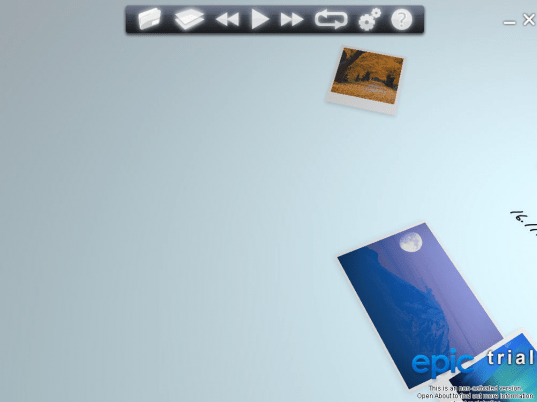
ePic is a revolutionary new photo viewer that displays your digital photo collection as if you were looking at pictures scattered across a huge desk. Move your mouse, and ePic pans your view across the vast landscape of photos - click on any picture, and you can move it, rotate it, and zoom in for a closer view. Review your pics, and drag similar photos together in one area of your desk to organize them! You can even opening photo collections directly into ePic right from Windows Explorer!
ePic also comes with the ability to showcase your photo collection in a snappy slideshow, complete with awesome transitions that take full advantage of the power of your graphics card. Whoosh!
ePic lets you:
* View your photo collection in an entirely new and innovative way.
* Pan across your entire photo library with a swipe of the mouse, rotate and zoom in to any of your pictures.
* Change the background of your ePic landscape.
* Set up slideshows of your pictures, complete with cool transition effects.
* Open photos directly into ePic from Windows Explorer.
Who Needs ePic?
You do if you've ever:
* Crawled your way through hundreds of photographs in thumbnail form.
* Used slideshow software that was difficult and disappointing.
* Wanted to show off the graphics capabilities of your computer.
|
|
Editor review: Reviewer, 2009-06-30 05:03:00
ePic is a photo viewer with physical and slide-show mode.
Features: ePic is a compact and easy-to-use program that has a simple user-friendly interface allowing you to start watching your photos easily. It provides an innovative 3D view mode. A realistic model of behavior photo objects at Surface view mode. You have full control over the objects using only the mouse. In the surface view mode the photos are displayed as if they strewn around on the table. You can move around and pick one. Move your mouse, and ePic pans your view across the vast landscape of photos - click on any picture, and you can move it, rotate it, and zoom in for a closer view. In the slide view mode the photos are presented as a slide show. You can integrate it with your favorite music.
Organizing photographs in the surface view mode is quite easy. Once can simply select photos of a similar nature and put them together in the virtual surface space to get them organized as part of the same group. Depending on the capabilities of your graphics card you have, you can also integrate elaborate page transitions in the slide show. The landscape over which you view the photographs in the surface mode can be changed to suit your liking or style. Open photos directly into ePic from Windows Explorer. It provides a quick and efficient way to open your photos. As the application supports multi-core processors, the performance of the application can be scaled up very easily when using these newer processors.
Overall: Really nice kind of photo viewer, particularly in the surface view mode.
|
 |
 |
Visit homepage of ePic
Download ePic 1.2
Popular search terms related to ePic:
slideshow, navigation, photo, cards, family, life, photos, cool, picture, collection
|

change background in your photos windows picture viewer able photo slide show best picture viewer photo show photo slide show viewer photo slideshows graphics library rotate pictures background slideshow

Programs related to ePic
|