
Free Downloads Center
e.g. 3D Architecture by LiveCAD 2.1

Latest Reviews

MediaMonkey

MediaMonkey
MediaMonkey is an all in one music manager and jukebox for music lovers to keep their collection more organized and flexible.

Smart Desktop Calendar Pro

Smart Desktop Calendar Pro
Smart Desktop Calendar Pro, the smart and customizable tool that provides a fully customizable personal calendar for your desktop.

Subscribe

3D Architecture by LiveCAD 2.1 Download

Editor's rating  
Users' rating   (4 votes) Rate it!
License Freeware / $0.00
Downloads 9557
Publisher LiveCAD Technologies
File size 398403K
Date added 6-Mar-2009
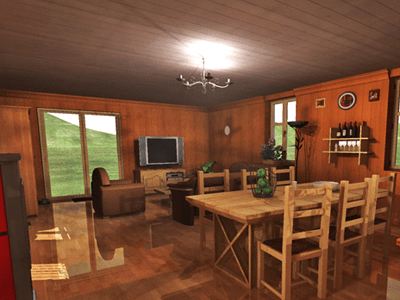
3D Architecture by LiveCAD screenshot

Enlarge screenshot

Publisher's description
Editor's review
Users' reviews (1)
Submit your review

- 2D plans with quotations, grid, 2D/3D simultaneous views
- Creation of beams, low walls and posts
- Automatic interior quotations
- Outline rooms in a single operation
- Over 2,000 3D objects and textures to decorate and furnish each room
- Quick creation of split-levels, interior walls and balustrades
- Fast application of textures and materials to all elements of your project
- Personalise the placing of wall and floor coverings from various angles
- Create land areas, paths and terraces
- Panoramic or hemispherical background for a more realistic 3D tour
- Use a range of advanced tools to modify the land area
- Automatic roof creation with a single click
- Parameters can be set for hundreds of models of staircases, doors and windows compliant with European and US standards
- According to the layout and space of your future kitchen, design a separate room or an American style kitchen
- Hundreds of fixtures and fittings for bathrooms : sinks, mirrors, bidets, showers, straight and corner bathtubs, accessories etc.
- Calculate images using ray tracing
- Global Illumination for a hyper-realistic photo quality rendering
- Control the type of lamp and the level of lighting
- Easy-to-use drawing-aid tools for high-level precision (help lines, grid)
- Real-time 3D rendering so that you can see and check the current layout

Editor review: Reviewer, 2008-11-13 08:18:00

Design, display, present and realize your building projects.

Pros: This is not for construction engineers or the architects. This instead is for property developers, designers and personal users. This is more for visualizing design and layout options available to decide on a general design. One is able to use the simple tools and wizards to do a quick 2D layout and then get the 3D visualization in a single click. Along with this simultaneous 2D/3D view you get 2D plan, quotations, grid etc. You are able to outline rooms in one operation. Create beams, low walls and posts easily. Split floor levels, interior walls and balustrade etc can be created easily. Roof creation is also automatic. Large number staircase, doors & windows according to French standards are available in the application library. These are easily configurable too. You can apply textures and materials to all the surfaces to give the models realistic looks. For example wall and floor coverings can be personalized. There’s a range of furniture and fittings you could use to set up the visualization. Over 2000 3D objects and textures such as armchairs, wall paintings, paper, paint, coffee tables, beds, wardrobes, bathroom fittings, decorative objects, wooden, metal and stone textures help set up models the way you want to make them. Bathroom fittings include sinks, mirrors, bidets, showers, straight and corner bathtubs, accessories etc. Landscaping is helped by several features. Create land areas, paths and terraces, panoramic or hemispherical background, areas of higher land, mounds and ditches etc. You could create realistic 3D tours. Helping all the modeling and visualizations are realistic rendering tools available with the application. Ray tracing does high quality rendering possible while global illumination, control of type of lamp and level of lighting help.

Cons: Compatibility with standard drawing formats like DWG and DXF would have been nice.

Overall: A very nice visualization and modeling tool it is quite easy to use and fills the niche it is positioned at. This certainly a 4 star package.

Visit homepage of 3D Architecture by LiveCAD

Download 3D Architecture by LiveCAD 2.1


time project
just another split
old photo
photo into drawing
photo design
time to photo
six photo
drawing models
photo drawing
photo style

Programs related to 3D Architecture by LiveCAD

Copyright © 2001-2009, Free Downloads Center.