
 |
 |
|
|
 |
 |
 |
 |
|
|
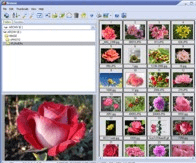
Able Image Browser is a full featured image viewing solution which is fast, simple-to-use and inexpensive.
Able Image Browser features:
Supports all common image formats: JPEG (JPG and JPE), GIF, Bitmaps (BMP, RLE and DIB), TIFF (TIF and FAX), Metafiles (WMF and EMF), Icons (ICO), PNG, PCX, TGA (TARGA, VDA, ICB, VST, PIX), PBM, PGM and PPM
Converting to Adobe PDF, PostScript PS, EPS, Wireless bitmap.
Thumbnails display with support for memory and disk caching
Images can be added to favorites for later viewing or saving as an image collection
Advanced thumbnail display, printing and exporting functionality
Three printing modes:
1 - Print the currently Selected Image(s).
2 - Print All Images in the current folder.
3 - Print Thubmnails for all images in the current folder.
Automatic choice of best orientation for printing
Assigning of text descriptions to images
Image manipulation functions including rotate, flip, crop, resize and various filters and effects
Multiple Copy / Rename
Removing the Red Eye effect (caused by flash photography).
Color adjusting.
Color mode converting.
Effects (Negative, Bupmap, Lens, Wave, Morph, User filter).
Forwarding of images via e-mail
All standard file and folder management functionality and image conversion features
Auto Adjust Orientation
Fast editing (brightness, contrast, cropping)
Able Image Browser is simple to use.
|
|
Editor review: Reviewer, 2008-12-24 09:02:00
Able Image Browser is a full featured image viewing solution which is fast, simple-to-use and inexpensive.
Pros: Able Image Browser is a fast, simple-to-use and inexpensive full featured image viewing solution. But then it is mot only a browser but has edit features and format conversion features. Mark photos as favorites, save them as image collections and find them easily for viewing later. Thumbnail viewing makes the printing and exporting functionalities fairly easy. Print selected images, all selected images in the current folder and print all thumbnails. During the selection use the thumbnail display for all images in the current folder. The application chooses the best orientation for printing. Add text descriptions to the images. Thumbnails display is supported by memory and disk caching.
Edit features include rotate, flip, crop and resize functions. Red eye removal is a very handy and useful tool that’s required often. Color adjusting and color mode conversion features help color adjustments easily. Color mode features help changing to 24 bit color and several modes of black and white. It also has several filters and effects you can apply to the images prior to saving them for the future or printing. Multiple copy and rename functions are useful. Negative, Bupmap, Lens, Wave, Morph and user filter are some of the effects available.
The Image browser supports most common formats that include JPEG (JPG and JPE), GIF, Bitmaps (BMP, RLE and DIB), TIFF (TIF and FAX), Metafiles (WMF and EMF), Icons (ICO), PNG, PCX, TGA (TARGA, VDA, ICB, VST, PIX), PBM, PGM and PPM. You can convert images to Adobe PDF, PostScript PS, EPS, Wireless bitmap also quite easily.
Cons: You should benchmark it for your specific formats in use prior to investment. Particularly if the images you handle are comparatively obscure ones.
Overall nice feature, easy to use this application rates a 4 star easily.
|
 |
 |
Visit homepage of Able Image Browser
Download Able Image Browser 2.0
Popular search terms related to Able Image Browser:
morph, eps, photography, tif, tga, adobe, resize, ico, wmf, tiff
|

converting gif to ico converting tiff to pdf eps conversion eps to emf eps to wmf eps pdf eps to pdf png to eps fax tif eps file

Programs related to Able Image Browser
This professional grade application is used to easily create and paste 2D PDF417, DataMatrix ECC200, Aztec, QR Code, Maxicode and many popular Linear ...
Automated Batch Print for drawings. No AutoCAD required. Batch Print is an easy-to-use application supporting DWG, DXF, HPGL, TIFF, SVG, CGM and other...
This multipurpose program not only converts graphics files, but it also includes more than 100 image effects, a rich tool set, and a tremendous time-s...
Convert PDF to Microsoft Word document with less conversion loss. Images and tables in PDF files will be extracted and saved. The conversion is very f...
AIV MP3 cutter can extract clips of any length from a MP3 song.These clips can be put as Ringtones of the cell phones.If the size of a MP3 file is goi...
Aleo SWF GIF Converter is an easy and fast way to batch convert SWF to GIF and GIF to SWF.
SWF to GIF Converter
* Convert Flash SWF to animate...
Do you want to create your own program? Algorithm2 is a free tool for game and software development at home. With its help anybody can create a progra...
SothinkAll-in-One FLV Solutions Pack, includingWeb Video Downloader, Video Encoder for Adobe Flash, FLV Converter and FLV Player,which can download,co...
Any DWG and DXF to Image Converter is a batch converter that allows to convert DWG and DXF files to TIFF, JPEG, BMP, GIF and PNG without AutoCAD. It a...
Any DWG and DXF to PDF Converter
Convert AutoCAD drawings to vector PDFs with Any DWG and DXF to PDF Converter.
New in Version 3 of Any DWG and DX...
|