
 |
 |
|
|
 |
 |
 |
 |
|
|
BatchPhoto is a powerful photo manipulation program that makes it easy to convert, touch-up, annotate, transform, apply effects, and rename hundreds of photos in a single operation. Instead of enhancing and adjusting pictures individually, BatchPhoto lets you select a group of images, define a series of edits, and apply them in a single operation!
With BatchPhoto you can: Convert images (to JPEG, PDF, TIFF, GIF, PNG and 100 more); Read and convert RAW image formats; Resize pictures automatically and even adjust the DPI; Annotate photos with date/time information, comments and watermarks; Rename hundreds of images in one session; Apply special effects like: sepia, black & white, oil paint, charcoal sketch and more; Touch-up photos by adjust the brightness, sharpness, contrast, and more.
But don't take our word for it, try it for free!
|
|
Editor review: Reviewer, 2008-01-22 07:34:00
With the BatchPhoto Pro 2.1.2 you can touch-up, transform, annotate, apply effects, and even rename large number of images with a single operation. Now you would not need to take the images individually as it allows you to select the entire folders for editing or applying the changes. It supports working with various formats like JPEG, BMP, GIF and many more formats that are used commonly by all.
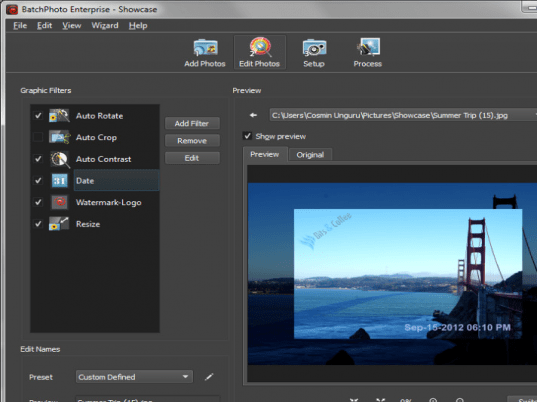
BatchPhoto Pro 2.1.2 has the decent look and the options are placed in a coordinated manner all over on the screen and the menu bar. First you need to make the selection for the images from the options given on the right side. You can also select the entire folder for the editing process and the added images are listed on the middle of the screen. You can even have the preview of the images to make sure that they are right ones. Then going to the ‘Next’ step you get to the ‘Add Filters’. Add the filters from the given like you can add sharpen, color balance, reduce noise, levels, equalize, flip, and different other effects. You can even crop, resize, rotate, and put watermarks text or images on them. You can set to modify the filename for left, middle and right part of it. Set the Folder for the output images, and select the output format to be PNG, JPEG, PDF, etc. You can change the Settings for opening the output folder after processing. You can also enable to have the date and attributes to be the same and even have the original photos deleted after the processing. Click on process and done you would get the photos modified as you wanted. You won’t have to repeat the process for making the changes on the same images as you can in advance have the preview of the original and modified images before processing.
BatchPhoto Pro 2.1.2 makes your pictures better and attractive than before and allows making desired changes to them. Rating point of 4.5 has been set for the variety of functions and features that it offers to the user for beautify your images. The fact that a range of editing can be performed by the help of few selections also holds the utility in good stead.
|
 |
 |
Visit homepage of BatchPhoto Pro
Download BatchPhoto Pro 2.6.1
Popular search terms related to BatchPhoto Pro:
photo effects, paint, profiles, resize, black, productivity, rotate, thumbnails, rename, photo
|

image rename screen annotate effects for photos edit photo manipulation effects makes convert to sketch paint pictures easy resize crop pdf picture watermarks

Programs related to BatchPhoto Pro
This professional grade application is used to easily create and paste 2D PDF417, DataMatrix ECC200, Aztec, QR Code, Maxicode and many popular Linear ...
Automated Batch Print for drawings. No AutoCAD required. Batch Print is an easy-to-use application supporting DWG, DXF, HPGL, TIFF, SVG, CGM and other...
A great and useful stuff tool for 3dsmax(especially for architecture design)* It can add unlimited number of material spheres and assign materials to ...
- 2D plans with quotations, grid, 2D/3D simultaneous views
- Creation of beams, low walls and posts
- Automatic interior quotations
- Outline rooms...
3GP Converter 2007 is a powerful 3GP converter which can convert AVI , MPEG, WMV, MP4, Mov and RM
videos to 3GP or 3GP2, AVI or FLV.
3GP Converte...
533soft Icon Changer can change the icon embedded in a executable or icon file. This program supports all files with the extensions .exe, .dll, .cpl,...
Able Image Browser is a full featured image viewing solution which is fast, simple-to-use and inexpensive.
Able Image Browser features:
Support...
Able PostScript Converter converts EPS, PDF, PRN, PS and AI formats into TIFF format in batch mode. You may choose various TIFF color modes and resolu...
Introduction
Ace Image Resizer is a powerful and easy-to-use image utility for image resizing, converting and other optimization.
Ace Image Resi...
This multipurpose program not only converts graphics files, but it also includes more than 100 image effects, a rich tool set, and a tremendous time-s...
|