


Editor's review
Nearly all of us like to relieve our memories of joyous occasions like festivals, weddings and birthday parties by going though the images that have captured those priceless moments for us to cherish. However, the viewing experience can be improved by turning your images into an attractive album. But, while doing so you may face trouble if your images are in dissimilar sizes and different file formats. Nonetheless, this problem can possibly be solved by trying the impressive assistance of Batch Image Resizer 3.5. Using the utility, you can effortlessly resize, flip, crop, rotate, rename, re-sample, and convert several images into the desired form. In addition to resizing and converting the images, the utility also lets you generate image thumbnails that can be set to view particular image from album.
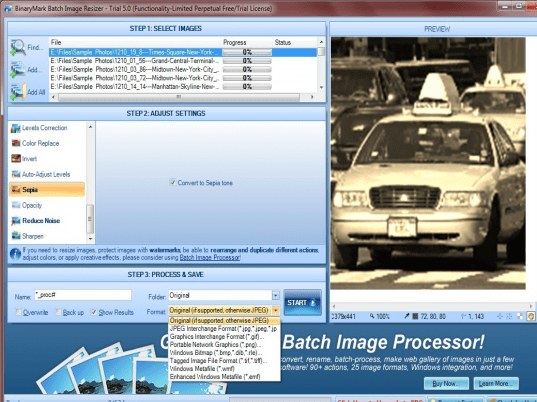
The Batch Image Resizer 3.5 lets you simultaneously alter multiple images according to your requirement. The first step for using the program is to add individual or multiple images to the program, which are simultaneously queued on the ‘Select Images’ area. The second step in the process is ‘Adjust Settings’ where you can choose to Resize, Crop, Flip, Mirror, Rotate, and Resample images by setting the relevant configurations. To help you confirm the modifications made to the images, it integrates a Preview area, which is also supported by options such as zoom, transparency grid, original size, and stretch to fit. The next step aids you in specifying how you want save the images. This step further lets you specify a name, destination folder, and image format to be jpg, png, gif, bmp, wmf or tiff, along with enabling the feature to overwrite the file and back up original image. Making the desired changes in attributes, press ‘Start’ and the program would store a new copy of images with applied changes.
With the Batch Image Resizer 3.5 software, it easy to resize, convert and perform other changes to the images in just few steps. Rated with a score of 3.5 points, the utility comprises of easy-to-navigate options that aids you in deriving desired output in an effortless manner.
User comments