


Editor's review
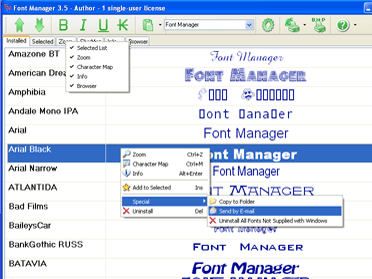
Font Manager with all main features necessary for everyday activities; simultaneously view all fonts installed, install/uninstall, uninstall all fonts not supplied with Windows, print list with font samples (installed or uninstalled).
Pros: Font Manager helps you manage fonts to be used in your machine. You are able to see all the fonts that are installed currently on the machine. Each font is shown with a complete line example of "The quick brown fox jumps over the lazy dog" that shows all the characters in the example font. There are several such lines of text that can be used as an example. You are able to clearly see the effect your choice of a font has on your text. To help you decide the effect further you can also see the effect of bold, italic and underlined characters in the same font. Once you have selected a font you need to select the size, style and color only. You are thus able to arrive at the optimal effect after checking out the effect of the fonts on the header of a website for example or the effect on the text in a logo that you have designed.
The designers of a particular font, what version is installed, the source etc can be viewed from the program. When uninstalling you cannot uninstall fonts that are necessary for Windows operation as such uninstall is protected. You are able to view folders which may have fonts that are not installed. You can clear the fonts that you do not use otherwise. Uninstall all the fonts that are not used in one click.
Cons: Nothing adverse noticed.
Overall: This is an application that is easy to use. Overall it is rated at 4 stars.
User comments