
Free Downloads Center
e.g. IconChanger 3.8 Editor review

Latest Reviews

LightMan Extractor

LightMan Extractor
LightMan Extractor is a simple and handy tool to rip and convert your favorite audio files without incurring loss in quality of the sound.

Namosofts Data Recovery 2

Namosofts Data Recovery 2
Namosofts Data Recovery 2, the safe and reliable tool useful for the recovery of your lost, deleted or formatted data.

Subscribe

IconChanger 3.8

Editor's rating   IconChanger screenshot

enlarge screenshot

Users' rating   (10 votes) Rate it!
License Shareware / $24.95
Downloads this week 77
Publisher Shell Labs
File size 1142K
Date added 13-Mar-2008
Publisher's description
Editor's review
Submit your review

Daily Reviews Team, 2004-04-09 01:10:10

    Change the look of your desktop by changing the icons. Use Icon Changer and give a new look to all of your icons. If you have always enjoyed different styles and designs, but have been restricted by the standard icon provided to you, then this program will be useful for you.
    To use this you don’t have to study hard bound manuals, all you have to do is click twice on the icon you want to change. Once you do that you would see a list of available options for you. Choose between the options and you would end up with a beautiful replacement. You would find this extremely useful if you use the search button very often. Most of the word files and excel documents come with a default icon and it becomes very difficult to differentiate between files. Now, with this you can assign very specific icons to each and every file and you would have easy access to it.
    This software can also save icon in a separate file or even copy it to the clipboard. You can also use any of your existing bitmaps as icons. With Icon Changer you would realize very soon that change is often good.

Daily Reviews Team, 2004-02-15 01:10:10

    IconChanger adds life to your desktop. The look of your desktop need not look dull and boring anymore.
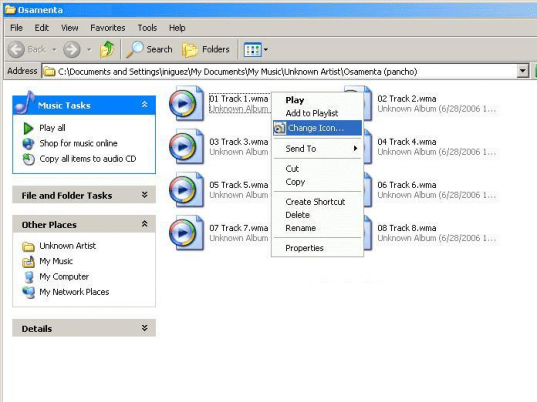
    This program makes changing the icons on your desktop simple and fun. Changing icons not only improves the look of your desktop, but also allows you to classify similar programs and applications and lets navigation for them easier. In some cases, you can customize even your document icons to suit the subject they comprise of. The process of changing an icon involves clicking the icon you want changed and selecting the icon you need to replace with. You can search for icons available on your hard-drive or from other sources. The interface of the program is easy to navigate. It works like our familiar Explorer view and can also be activated from the context menu. Cancel a changed icon by just undoing. Enter your search parameters and find icons from your disk drives, which are added to the icon list.
    Customizing your desktop is no more a complicated process. IconChanger knows exactly what you need to get.

Visit homepage of IconChanger

Download IconChanger 3.8

Software related to IconChanger

Copyright © 2001-2008, Free Downloads Center.