
 |
 |
|
|
 |
 |
 |
 |
|
|
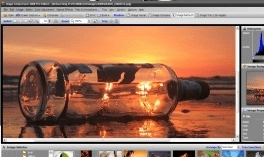
The perfect after-the-shot software, Image Compressor provides comprehensive set of tools. You can easily import, capture, scan, retouch, compare, create photo album, share and compress your images more efficiently than ever before.
Image Compressor 2008 compress and optimize your photo using revolutionary digital eye technology.
It uses up to 8x automatic snapshots, object detection, optimization and filtering technique to ensure the highest quality compressed photo. Image Compressor is for people who understand photo quality. It's you!
BONUS: 10 Essential Digital Photo Utilities
+ Image Viewer. Views more than 50 image types including the latest DSLR RAW.
+ Image Comparer. Compares 2 images side-by-side and get scientific comparison analysis between them.
+ Image Retouch. Retouch your photo with easy to use tools. Includes: Color management, JPEG artifact reducer, face enhancer, image merging and many more.
+ Web Photo Album Creator. Creates animated, interactive web photo album without HTML, Javascript or Flash knowledge. Album templates can be found in internet freely.
+ Batch Image Converter. Convert from any supported image formats to JPEG, PNG, TIFF, BMP or PDF.
+ Batch Image Resizer. Resize multiple images with 11 filters or let Image Compressor choose the best one automatically for you.
+ Batch Image Rotator. Rotate, straighten or auto skew multiple images directly.
+ Batch Image Watermarker. Add your copyright, or visual date time stamp to multiple images. Support both text based and image based watermark.
+ Batch Image Processing. Apply special effect to multiple images at once.
+ Screen Capture. Capture whole screen, active window, any object or any region on your screen
Why buy anything else, when right here you can have image compression and optimization software PLUS 10 more essential tools for all your imaging needs?
|
|
Editor review: Reviewer, 2008-05-12 09:11:00
When you shoot pictures, then you may want to perform various modifications to them to give them a final touch and make them look more beautiful. If you want to do so then try the Image Compressor 2008 Home Edition 6.1.0.2. This software enables the user to import the images and scan, retouch, create image album, share images, compress them and do much more. You would not face any difficulty in having the images compressed as the software ensures best possible quality and optimum size for the image. It supports different kinds of formats and the digital camera RAW images are also supported. With the program, you can also perform the function of screen capturing .
Image Compressor 2008 Home Edition 6.1.0.2 is helps you to have various modifications performed with your images. The software is capable of reading image files even from the removable drives and supports you with image viewer that is capable of showing images of different formats and even DSLR RAW images. You can perform the image comparison of the images and you can see the modifications in the middle of the screen. For making the images more wonderful and stunning you can have the image customized. You can change the level of contrast, brightness, hue saturation, RGB, histogram, gamma, and do many more. Change the look of the images completely and convert them to Negative, Black and White, Grayscale, and Sepia. You can have the images the resized, trimmed and them rotated or flipped into the direction required by you. Have the images cropped to give it a suitable view and even you can have the multiple images merged into one. Use different other tool provided with the program such as Polygon, Lasso, Magic Wand, Ellipse, etc. It also provides you with a variety of other features that make the software worth using for having the images changed perfectly according to the user’s preferences.
The Image Compressor 2008 Home Edition 6.1.0.2 supports batch processing, grabbing images from internet, screen capture and even setting images as wallpaper or sending them by email. The software can be best experienced while using it and for all the large varsity of features and performance, it has been given 4.5 points.
|
 |
 |
Visit homepage of Image Compressor 2008 Home Edition
Download Image Compressor 2008 Home Edition 6.7.0.0
Popular search terms related to Image Compressor 2008 Home Edition:
psd, shot, photo album, digital camera, digital photos, compress, screen capture, tiff, camera, album
|

convert pdf to flash compress tiff compress bmp how to compress jpeg jpeg to text converter image merging screen capture to flash convert jpeg to flash scan image for text pdf to png converter

Programs related to Image Compressor 2008 Home Edition
This professional grade application is used to easily create and paste 2D PDF417, DataMatrix ECC200, Aztec, QR Code, Maxicode and many popular Linear ...
Automated Batch Print for drawings. No AutoCAD required. Batch Print is an easy-to-use application supporting DWG, DXF, HPGL, TIFF, SVG, CGM and other...
- 2D plans with quotations, grid, 2D/3D simultaneous views
- Creation of beams, low walls and posts
- Automatic interior quotations
- Outline rooms...
533soft Icon Changer can change the icon embedded in a executable or icon file. This program supports all files with the extensions .exe, .dll, .cpl,...
Able Image Browser is a full featured image viewing solution which is fast, simple-to-use and inexpensive.
Able Image Browser features:
Support...
Able PostScript Converter converts EPS, PDF, PRN, PS and AI formats into TIFF format in batch mode. You may choose various TIFF color modes and resolu...
This multipurpose program not only converts graphics files, but it also includes more than 100 image effects, a rich tool set, and a tremendous time-s...
Advanced DWG to Image Workshop is a batch converter that allows you to convert DWG and DXF files to TIF (TIFF), JPG (JPEG), BMP, GIF and PNG without t...
Convert DWG and DXF Files Quickly and Easily without the need of AutoCAD.
Convert CAD drawings to sharable PDF files.
Advanced DWG to PDF Worksho...
Convert PDF to Microsoft Word document with less conversion loss. Images and tables in PDF files will be extracted and saved. The conversion is very f...
|