


Editor's review
When you have different drawings, they also vary in different aspects also. Sometimes you need to find out the differences within the versions of the AutoCAD drawings. OverCAD Dwg Compare 1.20 software would help you to make the comparison between the AutoCAD drawings and also display these graphically. Get the software that would make your work easier.
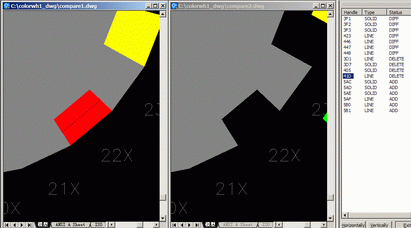
The software OverCAD Dwg Compare 1.20 is simpler in downloading and takes a little of your time for getting installed. The software works in an efficient manner and has features that are very easy to operate. It would help you to find the differences by comparing the two AutoCAD drawings easily. When the differences are found then the program shows the differences with the help of various colors for the Added and Deleted entities and so on. While looking up for the differences you can set the mark up colors to be of your own choice. The resulting file can be zoomed and synchronize the location by clicking the resulting report. For performing these functions you need to select two AutoCAD drawing files and make the selection of the temp path for the compare results. Then you need to select the temp settings for comparing like for the layer, color, text height, etc and set the colors for the different entities. Then make the selection for the different entities for comparing by checking or uncheck them. When the comparison is done then you can save the file with the detailed reports of the entities. Browse and select the compare result file instantly for having a look at the differences relating to various entities with the details. The software is good to use by the professionals and would prove to be helpful in their work.
The software has been given the deserving 3.5 rating points for its elegant features that help you to have a trouble free working experience. Get the software and start comparison between the different drawings.
User comments