
Free Downloads Center
e.g. PicRename 1.1.0.5

Latest Reviews

Animated Wallpaper Maker

Animated Wallpaper Maker
Add life to your desktop, decorate it with self created animation wallpapers with the help of Animated Wallpaper Maker.

Pimero Free Edition

Pimero Free Edition
Pimero Free Edition, perfect for private use this program will manage and organize all your personal information, appointments, emails, contacts, tasks and notes.

Subscribe

PicRename 1.1.0.5 Download

Editor's rating  
Users' rating   (2 votes) Rate it!
License Shareware / $9.95
Downloads 978
Publisher Reynold M. Deguzman
File size 329K
Date added 22-Sep-2008
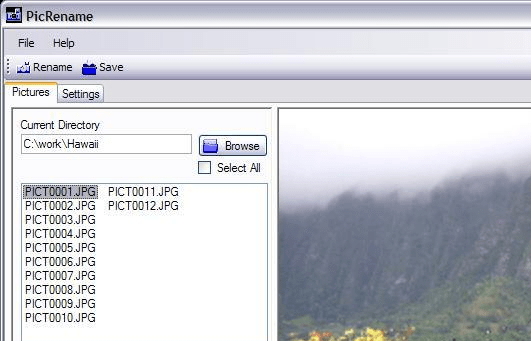
PicRename screenshot

Enlarge screenshot

Publisher's description
Editor's review
Submit your review

The smart renamer for your digital pictures. Generate unique file names for your thousands of jpg files which will allow you to copy them to the same directory without file name conflicts. Modern digital cameras save information about the picture in EXIF tags which are read by PicRename. Rename your JPGs using the following criteria: Date Picture Taken, Date Originally Created, Date File Created, Date File Modified.

Editor review: Reviewer, 2008-01-31 08:45:00

While copying your digital pictures you often may experience the problem that the system asks you to replace the pictures because of the same names. Every time you need to change the name of the pictures and then save them which ends up being a major hassle. Imagine the situation when you have to save a large numbers of pictures, then what? Well with the PicRename 1.0.1.9 it would become easy for you rename the pictures with the shots dates, etc. It makes it easy for you to remember the date and also arrange them in proper sequence in which they were taken.

PicRename 1.0.1.9 opens with the pleasant looking screen that has the simple options to work with. To start work with it you need to select the directory that contains the pictures and the containing pictures are shown on the left side of the screen. You can have the preview of the images on the right side screen; it also lets you assure that that you selected the right images. You can make the selection to click to Select All that places the mark on all the boxes that are placed in front of the images. For having the name changed you need to make the selection from ‘Settings’ option. For rename you can use from the given options. You can choose the Date Picture Taken, Date Originally Created, Date Created, and also set to enable to Show Previews and Milliseconds. The program can read the EXIF tags and set the Date accordingly if chosen. When you’re done with the selections then you are required to click ‘Rename’. The images would get rename and you can save the changes that you made.

The functions and working of the PicRename 1.0.1.9 is as simple as it appears from the description. You would not require much to do and also one of its best of the features is that the software can read the EXIF tags itself for setting the name. In consideration to the entire features ad working it has been given 4 rating points which is truly worth off.

Visit homepage of PicRename

Download PicRename 1.1.0.5


change date created
rename jpg
digital picture information
file renamer
exif date
copy iso file to dvd
renamer tool
dwg convert jpg
smart tags
repair jpg files

Programs related to PicRename

Copyright © 2001-2009, Free Downloads Center.