
Free Downloads Center
e.g. Quick Image Resizer 2.7

Latest Reviews

Asterix and the Great Rescue

Asterix and the Great Rescue
Asterix and the Great Rescue is a fun and fanciful game suitable to all ages with an addictive game-play.

Proposalsmartz Proposal Writing Software

Proposalsmartz Proposal Writing Software
Proposalsmartz Proposal Writing Software is an handy application that allows you to work about smartly with your business proposals and documents.

Subscribe

Quick Image Resizer 2.7 Download

Editor's rating  
Users' rating   (1 votes) Rate it!
License Shareware / $29
Downloads 69
Publisher DzSoft Ltd
File size 2916K
Date added 20-Oct-2009
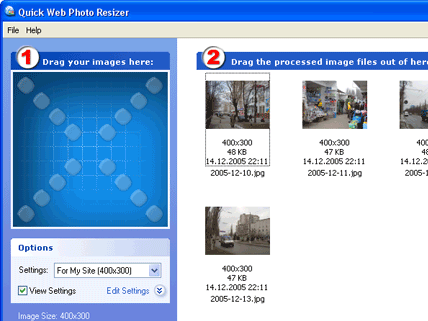
Quick Image Resizer screenshot

Enlarge screenshot

Publisher's description
Editor's review
Submit your review

Modern digital cameras produce images with up to 6 times higher resolution than their ancestors. While the resolution is very important to photo-printers, such resolution can be a severe drawback for on-screen and Internet viewing.
This is why, before uploading your images to the Web or sending them via e-mail, you use your imaging software to reduce their size. There are two main disadvantages of this method. First, you need to do the same repetitive actions every time. Normally, you have to navigate to the folder containing images from your camera, then you need to select the images, set up resizing options, select a target folder, etc. The second disadvantage is that when resizing your images you never know exactly what file size they will have after resizing. Photos with a lot of small details will be significantly bigger in size than simple images after resizing with the same level of JPEG Quality/Compression.
Quick Image
Resizer from DzSoft solves both problems. From now on, you don't need to bother with browsing through folders with your image viewer. This program offers an easy, yet very powerful, technique of resizing your photos. You simply select a conversion scheme and drag the photos to the program`s window. Your photos get automatically converted and you can drag them out, upload to the Web or send via e-mail. A "Conversion scheme" is a set of user-defined resizing options. You can define several sets for different purposes. The most exciting feature of the resizing options is that you can select the desired resulting image file size. The program will automatically choose a JPEG Quality/Compression level for each image to best fit the file size and dimensions that you've selected. In addition, the program can automatically watermark your images or place your logo on them. An option to keep or remove the EXIF metadata has been added.

Editor review: Reviewer, 2009-11-03 13:07:00

We usually need to resize our large size images to upload them to web site or sending via e-mail. You might find it difficult by using any imaging software because that would not give all the flexibility. Quick Image Resizer helps you to resize your image as per the resizing scheme and option selected by you. Application supports PNG, BMP, GIF, JPEG etc. image format file.

Features: The application has nice user interface and easy to use application. Anyone who has knowledge of computer can work with this program. Application has setting option to create scheme to resize. Click on edit setting link to open edit scheme setting option. Application allows you to crate / edit / delete scheme as per your requirement. It has an option to resize your image by specifying width and height; you can set an image size option such as lock aspect ratio, detect landscape / portrait, and don’t upscale the image.

You can also set an option, if the aspect ratio doesn`t match them make the image smaller or crop the image. Select an image type from the drop down to save the resize image, select JPEG and then you can select file compression option as by quality, by size etc. You have other options such as modify file name, keep EXIF/ XMP metadata, add a logo etc. Once all the settings are done, you can perform resize operation. Open or drag and drop the file which you want to resize on the blue color box. It will be immediately processed with the settings which we created, then just drag the finished image file from the right part of Quick Image Resizer. You can save all processed file in the selected folder.

Overall: This is an excellent image resize tool useful to web publisher and other users.

Visit homepage of Quick Image Resizer

Download Quick Image Resizer 2.7


logo jpeg
small image viewer
upload photo
web image viewer
jpeg file viewer
image viewer jpeg
viewer jpeg
image conversion
viewer image
reduce jpeg file size

Programs related to Quick Image Resizer

Copyright © 2001-2009, Free Downloads Center.