
Free Downloads Center
e.g. Quick Web Photo Resizer 2.4.2.0

Latest Reviews

Free Hex Editor Neo

Free Hex Editor Neo
Free Hex Editor Neo is an intuitive program having the power and ability to View, Edit and Analyze Hexadecimal Data and Binary Files of any Size.

Framing Studio

Framing Studio
Framing Studio, as the name speaks for it, this advanced tool allows you to add eye-catching frames and borders to your digital images.

Subscribe

Quick Web Photo Resizer 2.4.2.0 Download

Editor's rating  
Users' rating   (4 votes) Rate it!
License Shareware / $29
Downloads 4313
Publisher DzSoft Ltd
File size 2156K
Date added 25-Jun-2007
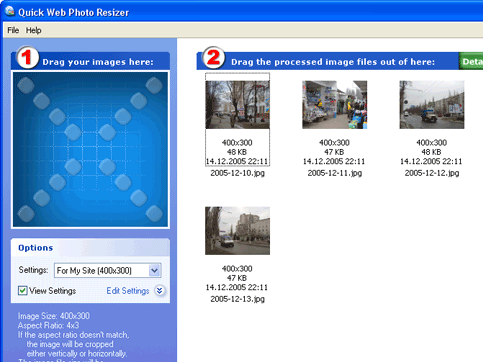
Quick Web Photo Resizer screenshot

Enlarge screenshot

Publisher's description
Editor's review
Submit your review

Modern digital cameras produce images with up to 6 times higher resolution than their ancestors. While the resolution is very important to photo-printers, such resolution can be a severe drawback for on-screen and Internet viewing.
This is why, before uploading your images to the Web or sending them via e-mail, you use your imaging software to reduce their size. There are two main disadvantages of this method. First, you need to do the same repetitive actions every time. Normally, you have to navigate to the folder containing images from your camera, then you need to select the images, set up resizing options, select a target folder, etc. The second disadvantage is that when resizing your images you never know exactly what file size they will have after resizing. Photos with a lot of small details will be significantly bigger in size than simple images after resizing with the same level of JPEG Quality/Compression.
Quick Web Photo Resizer from DzSoft solves both problems. From now on, you don't need to bother with browsing through folders with your image viewer. This program offers an easy, yet very powerful, technique of resizing your photos. You simply select a conversion scheme and drag the photos to the program’s window. Your photos get automatically converted and you can drag them out, upload to the Web or send via e-mail. A "Conversion scheme" is a set of user-defined resizing options. You can define several sets for different purposes. The most exciting feature of the resizing options is that you can select the desired resulting image file size. The program will automatically choose a JPEG Quality/Compression level for each image to best fit the file size and dimensions that you've selected. In addition, the program can automatically watermark your images or place your logo on them.

Editor review: Daily Reviews Team, 2007-02-21 01:10:10

    Quick Web Photo Resizer, this indispensable image processor and resizer will safely resize photos before uploading to the Web.
    With simplicity as its key feature this tool has the capability to process and resize your digital photos before uploading them to the web. Latest digital photos have 6 time’s higher resolution which may prove to be a hindrance for on-screen and Internet viewing. Henceforth this user tool has been designed to provide the user with the simplest interface for resizing these photos. All you have to do is drag the images to be resized into the program window where the images would be resized as per the user settings. The tool is supported with the resizing options in which you can select the desired resulting image file size. These resized images can be easily uploaded to the Web or sent via e-mail or even exported to a folder in your system.
    The other features of the tool are auto selection of JPEG Quality or compression level and add a custom logo or watermark to the images.

Visit homepage of Quick Web Photo Resizer

Download Quick Web Photo Resizer 2.4.2.0


resizing pdf
resizing png images
batch image resizing
watermark photos
reduce jpeg files
jpeg to web
photo upload
resizing animated gif
digital photo resizer
ifo file conversion

Programs related to Quick Web Photo Resizer

Copyright © 2001-2009, Free Downloads Center.