
 |
 |
|
|
 |
 |
 |
 |
|
|
Batch Processing to make DWG/DXF/DWF/DWF files to PDF files with NO need of AutoCAD Stand-alone utility - AutoCAD NOT required. Batch processing supported. DWG/DXF/DWF/DWF files created by every version of AutoCAD supported. Best format and version support: Input formats supported - DWG, DXF, DWF. Output formats supported - BMP, JPG (JPEG), GIF, PNG, TIF (TIFF). AutoCAD versions supported - R2.5-R2009.
True colors supported
Automatical or manual adjustment of the output pages size supported
Setting of output color (True Colors,Gray and Black-White) and background color supported
Conversion of model space, all layouts, all paper space, or last active layout to Image file supported
Output formats of BMP, JPG (JPEG), GIF, PNG, TIF (TIFF), etc. supported
DWG/DXF/DWF/DWF files created by all versions of AutoCAD (R2.5/2.6, R9, R10, R12, R13, R14, R2000/2002, R2004/2005/2006/2007/2008/2009) supported
Clean interface and simple buttons provided
|
|
Editor review: Reviewer, 2009-06-03 05:57:00
AutoCAD application helps you in creating architectural designs and plans, which usually are stored with DWG, DWF, or DXF. Files with these formats can only be used or viewed with AutoCAD or other such special viewer applications. Due to this, you often face troubles while creating presentations of architectural plans you’ve designed. However, to resolve this issue and make your presentations more impressive, you can try converting your DWG, DWF, or DXF files into image format file. Now, in order to perform this conversion you simply need to have an effective conversion utility. Well, you’re not required to hop through several websites for this, as articuCAD DWG DXF to Image Converter 3.5.3 can assist you through. The program facilitates batch conversion of DWG, DXF, or DWF files into images with GIF, BMP, JPG, TIFF, or PNG formats, without requiring AutoCAD.
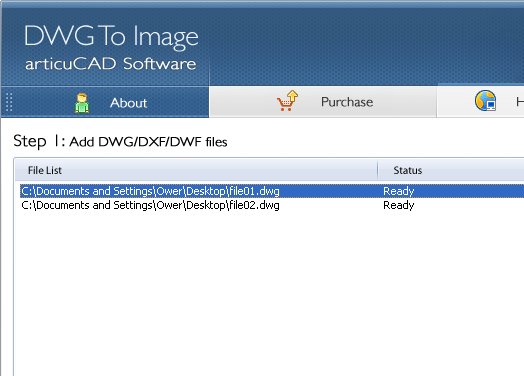
The GUI of articuCAD DWG DXF to Image Converter is designed intuitively and customized with catchy colors that prevent monotony while maintaining user’s interest. The process basically is comprised of four steps, you of which the first one is to add DWG, DWF, and DXF format files by clicking on Add Files, Add Folder or Search DWG, as is required. After which the selected files are lined up at main screen for carrying out the conversion process. Next with second step you’ve to choose and Output format from dropdown list and alter output options relating image size, colors, and overwrite features. Moving further, the third step of conversion process allows you to specify desired output location making it easier for you to access the resulting files. The fourth and final step includes ‘Convert’ button for beginning the actual conversion of selected files. As the process completes you can view and use the resulting files for further use.
With the articuCAD DWG DXF to Image Converter 3.5.3 it becomes easier for you to convert your DWG, DWF, and DXF files into different image format files for presentations, records, etc. Considering the smoothly carried out conversion procedure aided by effective feature-set and fantastic performance, the program has deservingly been assigned with 3.5 rating points.
|
 |
 |
Visit homepage of articuCAD DWG DXF to Image Converter
Download articuCAD DWG DXF to Image Converter 3.6.1
Popular search terms related to articuCAD DWG DXF to Image Converter:
dwg, pdf converter, dxf, autocad, tif, black, tiff, pdf, paper, layout
|

dwf pdf converter pdf to dwf converter dwg to dwf conversion dwf to dxf converter converter jpg to dwg dwf pdf dwf dwg converter dwf file dwf converter tif dwg

Programs related to articuCAD DWG DXF to Image Converter
Convert PDF to Microsoft Word document with less conversion loss. Images and tables in PDF files will be extracted and saved. The conversion is very f...
Fast and easy way to convert Flash SWF to animated GIF.It will be more suitable for transmission, using chat tools to release dynamic picture and any ...
Video to picture converter is an easy to use video-to-images and video capture software. You can extract all frames of a video file into separate imag...
Audio Redo Suite is a digital audio workstation. It can be used to record, edit, convert, extract audio files as well as rip and burn CDs. You can cre...
Audio EZWorkshop is everything you need to analyze, record, edit, and convert audio file, produce music loops, digitize and clean-up old recordings It...
Audio PowerSuite is an audio recording, editing, converting, extracting, CD ripping and burning suite, featuring an innovative and easy to use interfa...
batch convert image to pdf PNG, GIF, JPEG, JPG, TIFF, BMP, EPS, WMF image files to PDF format. Tiff To PDF Converter is a Windows application which ca...
Batch It! is an automated Batch Imaging Editor which allows you to resize, rename, add Smooth 3D captions, add watermark, add drop shadow, print and...
Batch It! Pro is an automated Batch Imaging Editor which allows you to resize, rename, rotate,add captions and more. It is a must-have tool for webmas...
BracketMerge is a digital image enhancement application used to merge exposure and/or focus bracketed images. BracketMerge enhances brightness, color...
|