


Publisher's description
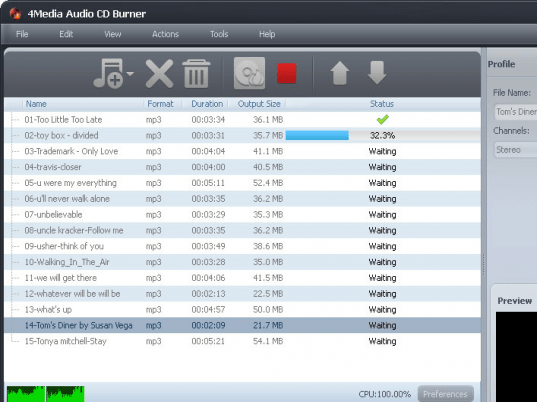
4Media Audio CD Burner, a music CD burner software with powerful functions, makes it possible to burn CDs from popular video formats like AVI, MPEG, WMV, DivX, MP4, H.264/MPEG-4 AVC, RM, MOV, XviD as well as common audio formats MP3, WMA, WAV, AAC, FLAC, OGG, APE and etc. Not only burning audios to a music CD, MP3 CD and WMA CD can also be burned to satisfy your different needs on music.
New features:
1.Support display and edit ID3 V2 information (users can attach cover, lyric and etc information for the music file).
2.Add more profiles.
3.Retrieve general information of CDs.
4.Utilize installer to reduce the installation time.
Key Functions:
1.Burn music CDs from AVI, MPEG, WMV, DivX, MP4, H.264/MPEG-4 AVC, RM, MOV, XviD, and 3GP video and many other video formats.
2.Burn audio CDs from MP3, WMA, WAV, AAC, FLAC, OGG, AP and many other audio formats.
3.It is determined by you to burn the audios into a common music CD or replicable MP3 CD and WMA CD.
4.Erase all the former content and then make a new CD by burning the audios into it.
5.You can make several copies of CD from the same video or audio resource by defining the copy number before burning.
6.Any length of the audio can be burned into the CD by giving different values of parameter.
7.By adjusting the parameters (audio codec, sample rate, channels and volume), the quality of CD is on your decision.
8.Burning CDs with multiple CPU cores and multiple threads for maximum speed.
9.Make CD burning work in background to balance your CPU usage.
10.You can decide the CD burning speed according to your need.
11.Auto-exit the application, shut down, hibernate, stand by system, or do nothing after burning which makes the whole process intelligent.
12.English, German, Spanish, French, Japanese and Chinese interface languages are available in 4Media Audio CD Burner.
New features:
1.Support display and edit ID3 V2 information (users can attach cover, lyric and etc information for the music file).
2.Add more profiles.
3.Retrieve general information of CDs.
4.Utilize installer to reduce the installation time.
Key Functions:
1.Burn music CDs from AVI, MPEG, WMV, DivX, MP4, H.264/MPEG-4 AVC, RM, MOV, XviD, and 3GP video and many other video formats.
2.Burn audio CDs from MP3, WMA, WAV, AAC, FLAC, OGG, AP and many other audio formats.
3.It is determined by you to burn the audios into a common music CD or replicable MP3 CD and WMA CD.
4.Erase all the former content and then make a new CD by burning the audios into it.
5.You can make several copies of CD from the same video or audio resource by defining the copy number before burning.
6.Any length of the audio can be burned into the CD by giving different values of parameter.
7.By adjusting the parameters (audio codec, sample rate, channels and volume), the quality of CD is on your decision.
8.Burning CDs with multiple CPU cores and multiple threads for maximum speed.
9.Make CD burning work in background to balance your CPU usage.
10.You can decide the CD burning speed according to your need.
11.Auto-exit the application, shut down, hibernate, stand by system, or do nothing after burning which makes the whole process intelligent.
12.English, German, Spanish, French, Japanese and Chinese interface languages are available in 4Media Audio CD Burner.
User comments