
Free Downloads Center
e.g. Extra Video Creator 6.64

Latest Reviews

EyeLine Video Surveillance Software

EyeLine Video Surveillance Software
EyeLine Video Surveillance Software is a powerful and capable video monitoring and recording software.

Classified Website Submission

Classified Website Submission
Classified Website Submission, can complete the task of submitting thousands of real free classified ads without any hassles.

Subscribe

Extra Video Creator 6.64 Download

Editor's rating  
Users' rating   (2 votes) Rate it!
License Shareware / $29.77
Downloads 3357
Publisher Extra Global Creativity
File size 6830K
Date added 14-Sep-2009
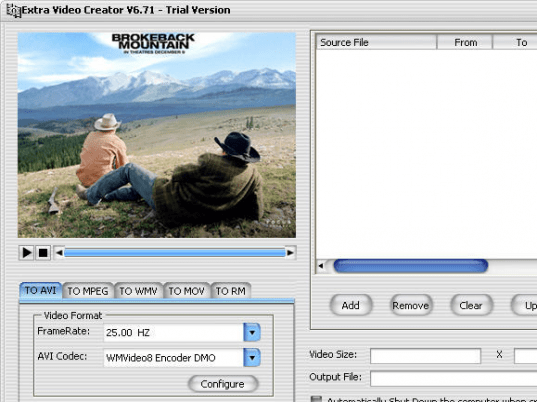
Extra Video Creator screenshot

Enlarge screenshot

Publisher's description
Editor's review
Users' reviews (1)
Submit your review

Extra Video Creator is the most able and fast video joiner and video converter software available. It joins and converts video from AVI, MPEG, MOV, RM and WMV formats into AVI, DIVX, XVID, MPEG, MOV, RM, RMVB or WMV video format.

Extra Video Creator lets you edit, join, and convert videos. Ideal for video production beginners. It is simple and easy, practical and functional-an ideal public-use video editing program. Use Extra Video Creator to edit your own home videos and upload them to a YouTube site.

Key features:
1). Edit, join, and convert video from AVI, MPEG, MOV, WMV and RM to AVI, with all encoded formats such as DIVX, XVID, Mircosoft MPEG-4, etc.
2). Edit, join, and convert video from AVI, MPEG, MOV, WMV and RM to MPEG, with all encoded formats such as VCD PAL/NTSC, SVCD PAL/NTSC, DVD PAL/NTSC, MPEG-1 standard, MPEG-2 standard, etc.
3). Edit, join, and convert video from AVI, MPEG, MOV, WMV and RM to WMV, with all encoded formats such as Windows media video for Dial-up modems / LAN / Cable modems / Broadband, etc.
4). Edit, join, and convert video from AVI, MPEG, MOV, WMV and RM to MOV, with all encode d formats such as H261 / H262 / H263 / MPEG-4, etc.
5).Edit, join, and convert video from AVI, MPEG, MOV, WMV and RM to RM file, with all encoded formats such as 150k LAN / 256k DSL or Cable / 16K substream for 28k Dial-up .

Why customers like Extra Video Creator?
1). Enjoy creative fun -- edit home videos, publish to YouTube, and get the appreciation of a world-wide audience.
2).Simple and easy - the intuitive interface lets you create video to AVI, MPEG, MOV, WMV, RM and RMVB with no experience and without needing a PHD degree in computer programming!
3).Guarantee - lifetime FREE Technical Support and FREE upgrades for registered users. Free trial download! 30-day money back guarantee. Try it-you'll love it!

More information: http://www.dvdcopyrip.com/extra-video-creator.html

Editor review: Reviewer, 2009-03-12 04:45:00

Is your video player e displaying the annoying ‘file format not supported’ message, when you try playing your favorite videos/movies on it? However, there is actually nothing to feel disheartened about, as you can play them by trying out file conversion as an effective solution. Now, in order to perform the conversion task, you must be looking for a proficient video conversion utility. However, if you are yet to find one then try out the new Extra Video Creator 6.28, which helps you in joining and converting the AVI, MOV, MPEG, WMV, and RM video formats into DIVX, XVID, AVI, MPEG, along with RM, RMVB, MOV, or WMV formats. Utilizing the features of the program, you can conveniently edit the videos, join them, and finally convert them to the desired format. It’s also beneficial to use, if you want to edit and share your videos with friends and family through website like YouTube.

The Extra Video Creator 6.28 comes across as a potent utility that performs editing, joining and conversion processes with ease. Just add the video/videos to the program that you wish to alter or convert, which then get listed at the top right section on the console. You can modify the sequence, remove or add more files easily with the help of the provided features. With the bottom left area of the console are provided AVI, MPEG, WMV, MOV, and RM format tabs. You can select the desired format for the conversion process, and alter the related configurations provided with the selected format tab. Altering the configurations, you can alter the video codec, framerate, audio format, samples, audio bitrates, profile, etc, as required by the selected output video format. Moving further, the video size can be altered and the output file can be stored to specific location. Finally, press ‘Create’ and the application would begin performing the task according to set preferences. Also you can set the program to shutdown PC when the creating task finishes.

Extra Video Creator 6.28 facilitates you in editing, joining, and subsequently converting the videos into the desired format to make them compatible with your player. With the neatly laid out console, easily set configurations, and smooth program performance, the utility is deservingly rated at 3.5 rating points.

Visit homepage of Extra Video Creator

Download Extra Video Creator 6.64


video joiner and converter
video converter and joiner
joiner converter
xvid avi joiner
dvd video joiner
divx file joiner
video file to home dvd converter
youtube to mov
joiner wmv
wmv video joiner

Programs related to Extra Video Creator

Copyright © 2001-2009, Free Downloads Center.