
Free Downloads Center
e.g. FairStars Audio Converter 1.77

Latest Reviews

Vitascene Starterkit

Vitascene Starterkit
Vitascene Starterkit is a professional tool that allows to manage and enhance the effects and transitions of images.

eCover Engineer

eCover Engineer
eCover Engineer, the professional tool that allows you to create outstanding eBook covers, CD covers, DVD covers and software box covers.

Subscribe

FairStars Audio Converter 1.77 Download

Editor's rating  
Users' rating   (1 votes) Rate it!
License Shareware / $24.95
Downloads 3076
Publisher FairStars Soft
File size 3361K
Date added 18-Nov-2008
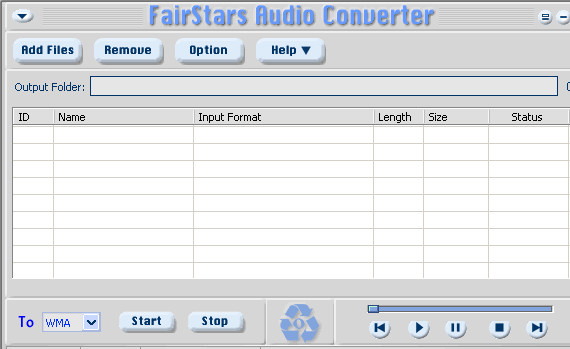
FairStars Audio Converter screenshot

Enlarge screenshot

Publisher's description
Editor's review
Submit your review

FairStars Audio Converter is a media file conversion tool to convert WAV, RealMedia(RM, RA, RAM, RMJ, RMVB), AIF, AIFF, AIFC, AU, Creative VOC, PVF, PAF, SVX, IFF, APE, FLAC, OGG, VQF, MP1, MP2, MP3, MP4, M4A, M4B, AAC, AMR, AWB, WMA, WMV, ASF to the popular formats - WMA, MP3, AAC, M4A, AMR, AWB, VQF, OGG, FLAC, APE and WAV formats. You can convert multiple files in a single batch, regardless of their source and target formats. The audio format conversions are performed without any temporary files, allowing high conversion speeds. Other features include normalization (adjust volume), support for ID3 tags and more.


1). Fast Conversion Speed: audio format conversion is performed directly without any temporary files, and thus enables high converting speed and economy of hard disk resource.
2). Batch audio files conversion: You can convert many files in one batch regardless of their source formats.
3). Support automatic volume adjustment(normalization) when converting.
4). Support automatic saving ID3 Tags when converting, and also support ID3 tags display and edit.
5). Playback of Popular Music Formats with its built-in player.
6). Support Drag and Drop: supports dragging and dropping files or folders from the File Explorer into the window of FairStars Audio Converter.
8). Explorer-like file input dialog: allows you to navigate through supported files on your computer and add them to File List easily and quickly.
9). Easy-to-use user-friendly interface with Unicode support.


1). Input Formats: WAV, RealMedia(RM, RA, RAM, RMJ, RMVB), AIF, AIFF, AIFC, AU, Creative VOC, PVF, PAF, IFF, SVX, APE, FLAC, OGG, VQF, MP1, MP2, MP3, MP4, M4A, M4B, AAC, AMR(AMR-NB + AMR-WB), WMA, WMV, ASF etc.
2). Output Formats: WMA, MP3, AAC, M4A(MP4 Audio), AMR(AMR Narrowband), AWB(AMR Wideband), VQF, OGG, FLAC, APE, and WAV formats.

Editor review: Reviewer, 2008-09-04 03:56:00

FairStars Audio Converter 1.70 is a proficient tool that supports the interconvertibility of various file formats, and helps you in getting your audio files converted from varied formats to the supported ones. The program is capable of inter-converting files in formats such as WAV, RAM, RMJ, RMVB, AIF, VQF along with likes of AF, IFF, FLAC, OGG, MP4, AAC, WMV, AWB, WMA, etc. The program also supports converting the different audio files in batch mode. The application consists of features to adjust the volume, save the ID3 tags, play the files with the in-built player. The program incorporates a user-friendly interface with Unicode support. The application is compatible with most versions of Windows operating system like Windows 2000/ 2003/ XP//Vista.

The FairStars Audio Converter 1.70 is a small and hassle free utility which makes different audio files compatible with your media player. To get the conversion process started you’re required to select the audio files to be converted. You can easily add the audio file by using the ‘Add Files’ option or by dragging and dropping the files from explorer windows into the program. The selection is shown listed at the middle of the interface with related information like ID, Input Format, Length, Status, etc. For specific selection you can remove the non-required files from the list. To check for the right file, you can play it with the helps of the built-in player. Next comes, the selection of the Output Folder by browsing the desired location. Further you need to select the format in which you want your files to be converted in, from the ‘To’ option’s drop down menu. To start the conversion process, click on ‘Start’, and even you can ‘Stop’ the process if required. You can make required changes with the ‘Options’ and you can take the guidance through the ‘Help’ option, whenever required.

FairStars Audio Converter 1.70 is a simplified application that supports the conversion of all your audio files into compatible formats for your media player, further the program is also capable of working in batch mode. The users need not worry about any complex features, and can easily operate the application to get the desired output and considering all the provided features into account, it is rated with 4 points on the scale of 5.

Visit homepage of FairStars Audio Converter

Download FairStars Audio Converter 1.77


m4b convert
m4b to mp3 converter
m4b convert mp3
converting amr to mp3
convert m4b to mp3
realmedia player
realmedia to mp3 converter
convert realmedia to mp3
converting to amr
converting amr

Programs related to FairStars Audio Converter

Copyright © 2001-2009, Free Downloads Center.