
Free Downloads Center
e.g. Pistonsoft MP3 Audio Recorder Free 1.3.2

Categories

Latest Reviews

File Backup Watcher Professional

File Backup Watcher Professional
File Backup Watcher Professional, the professional tool that makes you ready to face any situations by making handy backups of your vital data.

Registry Flashlight Fixer

Registry Flashlight Fixer
Registry Flashlight Fixer is a simple and handy registry booster that can also control hidden Microsoft Windows operation system settings.

Subscribe

Pistonsoft MP3 Audio Recorder Free 1.3.2 Download

Editor's rating  
Users' rating   (10 votes) Rate it!
License Freeware / $0.00
Downloads 9355
Publisher PistonSoft
File size 3264K
Date added 8-Feb-2008
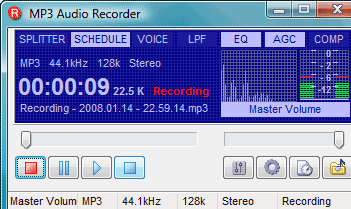
Pistonsoft MP3 Audio Recorder Free screenshot

Enlarge screenshot

Publisher's description
Editor's review
Users' reviews (3)
Submit your review

Record audio streams directly into MP3 or OGG format! Say 'no' to conversion, compression and post-production when recording Internet radio streams or podcasts! Pistonsoft MP3 Audio Recorder captures audio from any source, including line-in, microphone, or sounds that are played back on your computer by other applications, and enables you to save the recording into any sound format without the need to compress and re-compress, and completely bypassing the temporary files.
Do you know the audio format requirements already? Record directly into that format! Specify precisely the bitrate, sampling rate and bit depth of your recording, and specify the compression method to produce the recording exactly in the required format.
Need streaming audio to broadcast over the Internet? Pistonsoft MP3 Audio Recorder will record directly into a streamable file. Want to record a radio or TV show? No problem, Pistonsoft MP3 Audio Recorder is perfect for capturing audio streams and saving them into a more conventional OGG or MP3 format!
The advanced features of Pistonsoft MP3 Audio Recorder make it stand out among similar products. Are you attending a conference with parallel sections? Just leave your laptop unattended in a conference room to record the speech on a schedule. Alternatively, trigger the recording automatically with Voice Activation to start recording when there's sound, and stop when there's silence. In addition, Voice Activation automatically removes pauses and silence from the speech by only recording when someone is talking.
Make the recording crystal-clear with comprehensive filters that clean the recording and make voice legible and noise-free. Further improve legibility of the recorded voice or narration with Automatic Level Control that normalizes the recording in real-time, making silent voice louder and turning down loud speech.

Editor review: Reviewer, 2008-02-27 06:52:00

Captures audio from any source, including line-in, microphone, or sounds that are played back on the computer by other applications. Recording can be in any sound format such as MP3 or OGG.

Pros: Pistonsoft Audio Recorder enables recording directly into the target format, be it MP3 or OGG. One need not fiddle with intermediate conversions and then compressing etc. whether recording from the internet radio streams or podcasts. Audio source can be line in, microphone or the CD player.

If the recording parameters are known, set them directly and record in the format of choice. Bit rate, bit depth and the sampling rate can be specified and compression required defined directly and the audio recorded in the exact final format required.

Recording can be scheduled so that recording starts at predefined time, even when unattended. Voice activation helps to save storage space as recording happens only when there is audio activity. Pauses and silences are also removed.

Filters available make the recording as clean as possible. Voices are thus intelligible easily. Automatic level control also helps in this regards by normalizing the inputs in real time by turning up low voices while attenuating loud inputs.

The user interface is really nice. Ability to choose the color scheme makes it even nicer. The whole thing is designed to look like a car stereo system. The recording parameters of bit rate, source, stereo/mono modes etc are displayed directly. For choosing the settings, scheduling a recording etc appropriate screens open that has the fields for parameter settings.

Cons: Help documentation could have been more detailed.

Overall this is a nice application for recording audio directly into appropriate format. The program gets a 4 star rating.

Visit homepage of Pistonsoft MP3 Audio Recorder Free

Download Pistonsoft MP3 Audio Recorder Free 1.3.2


voice activation
voice conference
internet recording
record audio streams
microphone recording
mp3 to mmf format
sounds and audio
compress sound
compression audio
line recorder

Programs related to Pistonsoft MP3 Audio Recorder Free

Copyright © 2001-2009, Free Downloads Center.