


Editor's review
The Power MIDI to MP3 is the ideal all-in-one tool to convert batches of MIDI files to WAV, MP3.With this software you can convert midi to mp3, midi to wav. Power MIDI to MP3 provides direct MIDI conversion employing no sound recording.
Pros: This package is suited for batch conversion of MIDI files. It has everything needed for this kind of conversion. Unlike most such programs this package does not first create a sound file from MIDI and then convert to MP3 format or the WAV. MIDI (Musical Instrument Digital Interface) format is a sequence of commands to control one or more pieces of musical hardware or software such as synthesizers or sequencers. These commands are not sounds, they are instructions to do something (mostly to generate sound). For example: select Instrument #1 (Acoustic Grand Piano), play Note #60 (C5) with Velocity #127. So you cannot represent, for example, human speech in MIDI format, but you can edit any note or change any instrument in music recorded in MIDI file. Direct converting lets you to get CD-quality output files. Power MIDI to MP3 is easy-to-use MIDI Converter designed to convert midi files easily with just a mouse click.
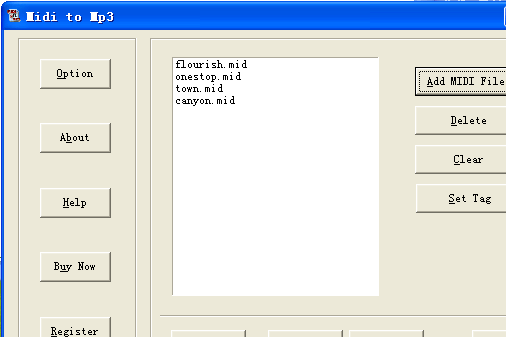
Optionally convert to either MP3 or WAV format. The package provides full support for audio track tags. Both versions ID3v1.1 and ID3v2 are supported so that a lot of information about the track could be maintained. Supports most popular MIDI formats (MIDI 0, MIDI 1, RIFF MIDI 0, RIFF MIDI 1, KARAOKE MIDI). The interface is simple, first thing is creating a list of MIDI files. Set tag option allows collection of tag information via a popup screen. Option button pops up the WAV and MP3 related option fields. These include in the case of WAV the sampling frequency and mono/stereo options. In case of MP3 the choices are besides the sampling and channel (mono/stereo); encode mode such as CBR/VBR and ABR, in the preset category a range of choices. After output file settings it is a single click process for the whole batch. Review the output from the package itself.
Cons: No issues looks like.
Overall a good and simple application that does the defined job well. This rate for 3 stars.
User comments