
 |
 |
| Editor's rating |
|
enlarge screenshot
|
| Users' rating |
(7 votes) Rate it! |
| License |
Shareware / $39.95 |
| Downloads this week |
6431 |
| Publisher |
MIDI to MP3 WAV |
| File size |
656K |
| Date added |
15-Sep-2008 |
 |
 |
 |
 |
|
|
Reviewer, 2008-07-04 09:17:00
This is a very easy to use CD/DVD burner that burns media including HD DVD and Blue-Ray types also.
Pros: Romeo combines the simplicity of standard CD-recording software provided with your computer and power of professional software for recording, ripping, mastering and editing of CD and DVD. Romeo Burner is a very easy to use burner that even complete novices could use. Romeo burns all the formats you can find to burn CD, DVD, Blu-Ray and HD-DVD discs. This can be used to copy your audio discs to hard drive in MP3 or WMA format. Copying of CD or DVD to the compressed file on your hard disc or copying ISO and formats of Nero & Alcohol programs into a DVD is easy.
Once installed Romeo Burner, a new folder "Romeo Projects" will appear on you’re my Documents. Click twice the "Romeo Projects" icon on your Desktop. Create new project and fill it with files by copying them from other folders. Then burn the content onto a disc. Even simpler would be to select a folder of content and choose “Add to Romeo Project” and start burning. You can rip audio discs to your hard drive in MP3 or WMA format. Built-in MP3 tag editor and CDDB database access helps you to manage your music collection. You can make a copy of CD or DVD in the compressed file on your hard disk. Romeo Burner support the following file formats: Nero, Alcohol and ISO. Make any number of copies of important discs. “Erase Disc” allows erasing of the writeable media. Being integrated with the Windows explorer the application allows any number of “New Group”, “New Folder”, “New Project” to organize CD projects. Finally the command line interface would delight the heart of experienced users with simple yet powerful interface to CD/DVD burning.
Cons: No problems noticed.
Overall: This is a truly powerful and flexible DVD burning application. It has a lot of features, is easy to use and rates a 5 star easily.
Reviewer, 2008-07-04 09:16:00
The Power MIDI to MP3 is the ideal all-in-one tool to convert batches of MIDI files to WAV, MP3.With this software you can convert midi to mp3, midi to wav. Power MIDI to MP3 provides direct MIDI conversion employing no sound recording.
Pros: This package is suited for batch conversion of MIDI files. It has everything needed for this kind of conversion. Unlike most such programs this package does not first create a sound file from MIDI and then convert to MP3 format or the WAV. MIDI (Musical Instrument Digital Interface) format is a sequence of commands to control one or more pieces of musical hardware or software such as synthesizers or sequencers. These commands are not sounds, they are instructions to do something (mostly to generate sound). For example: select Instrument #1 (Acoustic Grand Piano), play Note #60 (C5) with Velocity #127. So you cannot represent, for example, human speech in MIDI format, but you can edit any note or change any instrument in music recorded in MIDI file. Direct converting lets you to get CD-quality output files. Power MIDI to MP3 is easy-to-use MIDI Converter designed to convert midi files easily with just a mouse click.
Optionally convert to either MP3 or WAV format. The package provides full support for audio track tags. Both versions ID3v1.1 and ID3v2 are supported so that a lot of information about the track could be maintained. Supports most popular MIDI formats (MIDI 0, MIDI 1, RIFF MIDI 0, RIFF MIDI 1, KARAOKE MIDI).
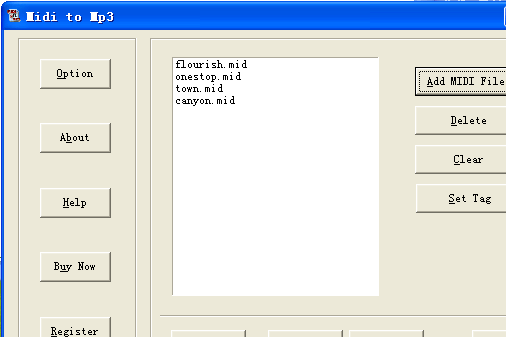
The interface is simple, first thing is creating a list of MIDI files. Set tag option allows collection of tag information via a popup screen. Option button pops up the WAV and MP3 related option fields. These include in the case of WAV the sampling frequency and mono/stereo options. In case of MP3 the choices are besides the sampling and channel (mono/stereo); encode mode such as CBR/VBR and ABR, in the preset category a range of choices. After output file settings it is a single click process for the whole batch. Review the output from the package itself.
Cons: No issues looks like.
Overall a good and simple application that does the defined job well. This rate for 3 stars.
|
 |
 |
Visit homepage of Power MIDI to WAV/MP3
Download Power MIDI to WAV/MP3 2.9
|

Phantom Burner is a Blu-ray BD-RE/DVD+RW/DVD-RAM/CD-R/BD-ROM/DVD-ROM/CD-ROM burner drive. It not only allows you to mount disc image files as virtual ...
Afree DVD Ripper is a powerful and easyful DVD ripper which helps you rip DVD to VCD, DivX, MPEG, SVCD, AVI, MP3, WAV easily and quickly with excell...
MP3 WMA Cutter supports MP3, WAV, WMA and OGG batch cutting. With MP3 WMA Cutter, you can cut piece from a big audio file and then convert it to a MP3...
Fox DVD to iPod/MP4 Video Rip/Convert Solution features a powerful DVD ripper that can rip DVD movies to VCD, SVCD, AVI or iPod with no quality loss, ...
MP3 Boss allows you to easily/fully manage & play your MP3 song files. MP3 Boss includes integrated support for WinAmp, automatic scanning of MP3 tags...
TwistedWave is a very easy to use and powerful audio editor.
It supports Audio Unit plug-ins and many file formats, including wav, aiff, caf, mp3, ...
Free MP3 CD Ripper is a powerful and easy CD ripper application. It builds CD ripper and audio converter in one. You can easily rip your favorite audi...
Free MP3/WMA/OGG Converter helps you convert WMA to MP3, MP3 to WMA, WAV to MP3, OGG to MP3, etc with friendly interface and lots of useful features. ...
Convert AVI, WMV, MPG to MPEG1,2,DVD,VideoCD,xDiv, DivX.Input formats: AVI, MPEG, WMV;Output formats: MPEG, MPEG2, DivX, xDiv, DVD;TV System support: ...
Tiny windows application that allows you to record a voice message and post it online immediately. After recording you can just insert link to the voi...
|