
Free Downloads Center
e.g. Snap 'n Burn 2.0

Latest Reviews

Animated Wallpaper Maker

Animated Wallpaper Maker
Add life to your desktop, decorate it with self created animation wallpapers with the help of Animated Wallpaper Maker.

Pimero Free Edition

Pimero Free Edition
Pimero Free Edition, perfect for private use this program will manage and organize all your personal information, appointments, emails, contacts, tasks and notes.

Subscribe

Snap 'n Burn 2.0 Download

Editor's rating  
Users' rating   (1 votes) Rate it!
License Freeware / $0.00
Downloads 564
Publisher Pianosoft
File size 2256K
Date added 25-Jun-2009
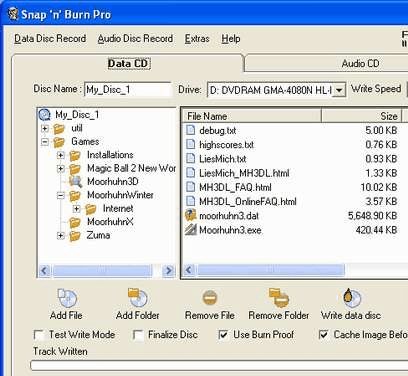
Snap 'n Burn screenshot

Enlarge screenshot

Publisher's description
Editor's review
Submit your review

With Snap 'n Burn you can:
-write audio CDs, data CDs and data DVDs
-write files to disc images and burn discs from them (ISO images support)
-continue previously written discs with additional tracks (multisession disc creation)
-quickly or fully erase rewritable discs
-control behavior of your drive (open, close, lock and unlock drive tray)
Snap 'n Burn has very friendly and intuitive user interface. All commands and options are at a glance through appropriate button and check boxes, also can be quickly accessed through keyboard shortcuts. Data and audio disc recording is simple, quick and convenient as possible. All actions are performed on single screen, in few mouse clicks, without complex terms and abstruse technical details.
Snap 'n Burn supports majority of modern IDE/USB/SCSI/FireWire DVD/CD writing drives. Software supports long file name and multi-language (Joilet) file system. It supports buffer protection (BURN-Proof) technologies for error free writing process.

Editor review: Reviewer, 2009-07-24 08:37:00

Snap Burn writes audio CDs data CDs and DVDs, write data to images and burn discs from them. You can continue written discs, erase them and control behavior of your drive (tray lock and unlock). Software has burn proof mode for error free recording.

Features: Snap `n Burn has can be operated very easily. The interface is quite friendly and intuitive. All the available actions are apparent with a look at the interface. Few clicks on the interface and you are done. It records data and audio discs. The process is simple and quick so that even novices should be able to burn CDs very quickly, very friendly and intuitive user interface. All commands and options are at a glance through appropriate button and check boxes, also can be quickly accessed through keyboard shortcuts. Most current drives whether they have IDE, USB. SCSI or Firewire interface can be used for actual burning. The utility writes files to the disc images and actual writing to the disks is done from the image. ISO image standard is supported. Multi session writing is supported too so that a disc can be fully utilized. It helps you write audio CDs, data CDs as well as data DVDs. Long file names and multi language file system such as Joliet is supported. Buffer protection or the so called burn-proof method is supported on the application. Erasing of discs is taken care of by the program. It is able to control the drive completely in terms of open, close, lock and unlock the drive tray.

Overall: Good and a handy tool but just like one of any other available. Blu-ray support is not clearly mentioned, so that must be lacking.

Visit homepage of Snap 'n Burn

Download Snap 'n Burn 2.0


how to open iso file
dvd rewritable
burn iso to usb
usb iso
burn iso file
usb burn
iso dvd burn
dvd iso burn
how to burn iso to dvd
dvd burn iso

Programs related to Snap 'n Burn

Copyright © 2001-2009, Free Downloads Center.