
Having too many music files with various formats? Often because of different formats it’s not possible for us to play some files with a particular program that we have. So we end up with the need to convert these files and help us do just that Switch Audio File converter is around.
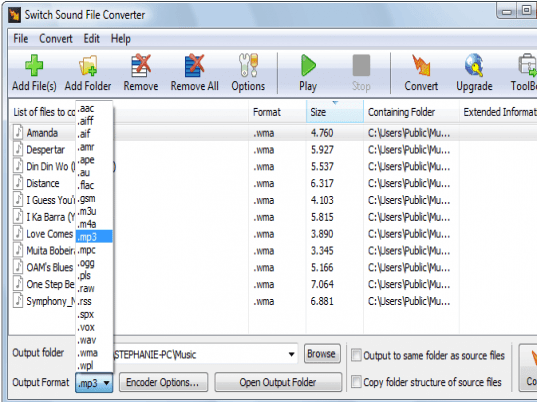
The software has simple options to work with that you can experience by downloading and installing it which does not take much of your time. The appearance of the program after launching it is uncomplicated and effortless to understand. It has the options on the toolbar to perform the function. You can simply add the files that you want to convert with the ‘Add File(s)’ option. The list of the selected files and folders is shown listed in the middle of the program screen. It is shown with information like format, size, containing folder, etc. You can select the individual files or even the folders to convert various files altogether. Then what you need to do is to select the format in which you want your file to be converted. You can select the ‘Encoder Options’ and set the encoder bitrate, select the channel, and enable the variable bitrate, etc. If you don’t want to apply the changed settings then you restore the defaults. You can remove the selected files or even remove the selection altogether. You have the ‘Options’ for different settings that you can select according to your requirement. You can select the ‘Overwrite Option’ for creating new converted file or overwrite the original one. You can set the format, error, audio processing option also. You can also have the options like CD Track Options, to run the program in the background, for sound playback, context menu, and to set the right click options, etc. To do more you also have the ‘Toolbox’ option. When you’re done with the settings then simply press ‘Convert’ option and the work is done. You can even play the file before converting it to another format. The program has an attached help file with html format that informs you about the functioning of the program. It supports files of various formats to convert from and to convert to.
The program has been given 3 rating point for the functioning efficiency of the program. So enjoy music by making them in any format customized for just about any device; from your favorite ipod to your car audio player.
3herosoft Audio Encoder can convert audios for burning Audio CD, MP3 CD or WMA CD, and fast rip Audio CD to popular audio formats. Three main function...
3herosoft MP4 to DVD Burner is a fast and easy-to-use MP4 to DVD burner software which helps you burn MP4 to DVD disc playable on portable/home DVD pl...
3herosoft Music CD Burner can burn MP3 CD, WMA CD and Audio CD from audio formats like WAV, AAC, AC3, AU, FLAC, M4A, MP2, MP3, OGG, WMA, etc., and vid...
While majority of today’s digital video capturing devices support DVD formats; some of them do not and eventually, we require some specific players to...
4Media Audio CD Burner, a music CD burner software with powerful functions, makes it possible to burn CDs from popular video formats like AVI, MPEG, W...
4Media MP3 WAV Converter program is designed to convert between MP3 format and WAV format, you can convert WAV music file to MP3 format to reduce the ...
Since the advent of the telephone utility by Graham Bell till the emergence of mobile phones; the ways and means of communication have experienced a r...