
Free Downloads Center
e.g. VidGIF 2.6.6

Latest Reviews

Vitascene Starterkit

Vitascene Starterkit
Vitascene Starterkit is a professional tool that allows to manage and enhance the effects and transitions of images.

eCover Engineer

eCover Engineer
eCover Engineer, the professional tool that allows you to create outstanding eBook covers, CD covers, DVD covers and software box covers.

Subscribe

VidGIF 2.6.6 Download

Editor's rating  
Users' rating   (3 votes) Rate it!
License Shareware / $29.95
Downloads 5571
Publisher GeoVid
File size 10575K
Date added 23-Oct-2009
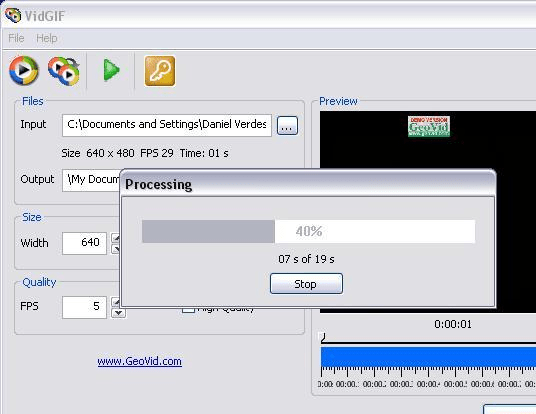
VidGIF screenshot

Enlarge screenshot

Publisher's description
Editor's review
Submit your review

VidGIF is a tool for converting selected video file to animation GIF formats. By using VidGIF you can create amusing avatars, animated logos for your website. It`s also useful for webmasters who want to place graphic on the website. VidGIF converts video of any format that could be watched on PC. It supports AVI, WMV, MOV, MPEG and other video files. VidGIF allows one having control over width, height and FPS of GIF animation. But note that the smaller size your video has the better quality of animation GIF you will get. VidGIF has very simple and friendly-using interface, that`s why you will not have any difficulties to manage it.

Editor review: Reviewer, 2009-04-06 05:20:00

VidGIF is a tool for converting selected video file to animation GIF formats. By using VidGIF you can create amusing avatars, animated logos for your website. It’s also useful for webmasters who want to place graphic on the website.

Features: VidGIF is a tool that converts video files to animated GIF. You can create amusing avatars, animated logos for your website etc. The animated GIFs being comparatively lightweight than complete video file, webmasters can make use of these when full video may not be required. VidGIF converts video of any format that could be watched on PC. AVI, WMV, MOV, MPEG and other video file formats are supported. VidGIF allows you control over several aspect of the animated Gif produced. Height, width and frames per second to be displayed can be controlled. Typically smaller sized videos have better quality when produced as GIFs.

The interface is simplest possible. You can select the input and the output files, the height, width and frames per second. You can choose to have high quality by clicking the high quality check box. Once these choices are made you just have to click on the start button. The processing starts and a pop up appears that shows you progress.

Overall: Quite an easy to use converter.

Visit homepage of VidGIF

Download VidGIF 2.6.6


video to animation
website graphic
mpeg into gif
animation tool
video to gif converter
converting avi file to mp4
converting wmv to divx
mov convert to wmv
email animation
create animation

Programs related to VidGIF

Copyright © 2001-2009, Free Downloads Center.