
Free Downloads Center
e.g. Animated Captures Maker 2.1.1

Latest Reviews

Animated Wallpaper Maker

Animated Wallpaper Maker
Add life to your desktop, decorate it with self created animation wallpapers with the help of Animated Wallpaper Maker.

Pimero Free Edition

Pimero Free Edition
Pimero Free Edition, perfect for private use this program will manage and organize all your personal information, appointments, emails, contacts, tasks and notes.

Subscribe

Animated Captures Maker 2.1.1 Download

Editor's rating  
Users' rating   (1 votes) Rate it!
License Shareware / $9.95
Downloads 1771
Publisher RasterVect Software
File size 1221K
Date added 31-Jan-2008
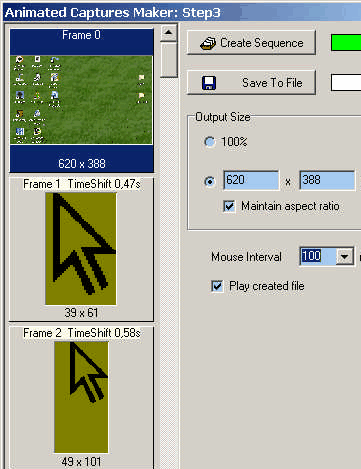
Animated Captures Maker screenshot

Enlarge screenshot

Publisher's description
Editor's review
Submit your review

Animated Captures Maker is a software tool to make presentations and tutorials about using software programs. It is a simple but powerful screen-recording software that allows you to capture cursor movements, menu selections, pop-up windows, layered windows, typing, and anything else you see on your screen. You can capture screen in many ways, including full screen capture, region capture, active window capture, object capture. The program has an easy-to-use and intuitive interface. Whatever you can see on your screen, Animated Captures Maker will record easily and fastest in animated GIF format. It will especially suit making demos, tutorials, and training animations. With created tutorials and presentations you can advertise your software or answer questions about the use your programs visually for supporting your customers. Animated GIF format is the most browser-friendly and compatible graphics format that can be used for Web animations. GIF format can store its own selective palette information within its binary data, and can produce good-quality results by using a Lossless type of compression that can reduce file size, while maintaining image integrity. Animated GIF's are supported by most browsers either directly or by plugins. You also can view Animated GIF in the most common Windows help format (*.CHM, also known as "compiled HTML").
Latest version changes:
Active window capture has been added.

Editor review: Reviewer, 2007-10-25 06:19:00

When you make software you are also required to set the tutorials for explaining the features as well as how to use it. For this you need to have the steps recorded that could guide the users to use the program. Animated Captures Maker 2.1 software would prove to be of good assistance to you for performing the task.

The software performs the work easily so if you want to have the features of the software benefit you then you just need to download and install it at your system. If you want to create demos and tutorials then the software would prove to be worthy to be owned. A small screen appears in front of the user. Set the capture frame rate measure according to your animation requirements. You can select with much of ease what you want to record like whether you want the entire screen or selected area. Even you can select the current window or object to be recorded as animation. Then you just need to make the selection or the entire window gets recorded after you click the pause button on the keyboard. When you want to stop the recording then you need to click the ‘ESC’ button. The software if set to system tray needs to be opened for creating a sequence and that is shown to be generated in the bar. You can make the mouse interval selection and select the output size in respect to pixels. The generated frames are shown in the left side of the screen you can see all the frames with time shifts shown below each frame. After having the frames made by the program you can save them to file for having an animation file. Play them & place them with your softwares or set them with your presentations. The software does not contain any help file for providing any information about the working of the software.

Animated Captures Maker 2.1 software has been deservingly rated with 3 points for its ease of use and effective performance. Get the software tool get the most impressive presentation and demos prepared with it.

Visit homepage of Animated Captures Maker

Download Animated Captures Maker 2.1.1


gif to cursor
easy gif maker
basic pc tutorials
screen capture full version
mov to animated gif converter
html capture
how to make gif file
after effects tutorials
video screen captures
animations maker

Programs related to Animated Captures Maker

Copyright © 2001-2009, Free Downloads Center.