


Editor's review
While creating video or movie DVDs professionals have to give considerable time in generating eye-catchy and effective autoplay menu to ensure easy content accessibility for the end-users. However, the autoplay menu creation task consumes much time and effort and thus one should go for an easier mode and opt for Autoplay Menu Designer 3.4 software for the purpose. The program supports building professional autorun menus for your DVD, CD-ROM, USB Flash drives, etc. The user can either create the menus entirely by self or else use the pre-defined layouts provided as samples. When creating the menus you can insert graphics, events, buttons, text, etc to form autoplay menu providing eye-catchy appearance along with simple navigation. You can generate several pages for menu and even can embed various pages into a single page.
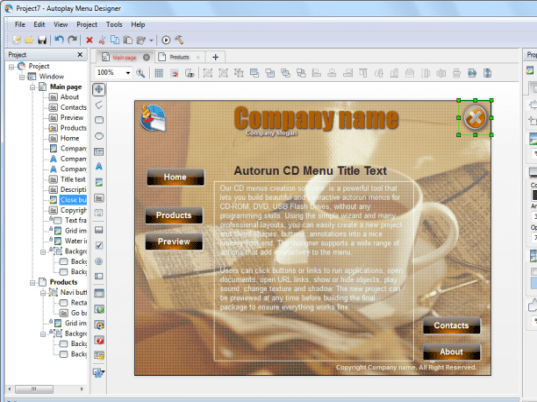
For creating the autoplay menu using Autoplay Menu Designer you’d have to create project that is loaded at the left panel for adding menu pages. Within a project you can add up different pages to make selection process easier for the end-users of DVD CD-ROM, etc. Along with this, you also have to define project settings like project folder, window style, background, position, splash screen, output folder, etc. Next, using the Properties Bar you can define name, position size, hide/lock object, flooding, gradient, font, alignment, opacity, margin, and various other ‘mouse over’ and ‘on click’, features. Moving on, you can add polylines, cooltext, images, hot areas, shapes, Flash video, media player, etc. You can assign different interactivity events to every object making it easy for users to navigate through content using the menu. Further, you can check the menu’s function with preview window and make necessary changes. After creating the menu, use Build Project wizard for packaging it for deployment over CD-ROM, with output including standalone AutorunMenu player, autorun.dat, and resource files. Now, you can burn the output to disk and view the menu finally working,
With the Autoplay Menu Designer software you can generate impressive and easily navigable autoplay menus for your DVD, USB flash drives, and CD-ROM. Considering its easy to use features and its overall remarkable performance, the program is rated with 4.5 points.
User comments