


Editor's review
Internet feature since its inception has largely contributed to the creative procedures and processes that entail image processing, designing and layout. Further, it also helps in sharing information and distributing it duly. So when we talk about capturing screenshots and screen recordings, it is no herculean task, especially when the option of print screen and varied screen capturing programs are available with us. However, problem comes when we are required to edit or modify the screenshot which makes it a difficult proposition for the user to duly utilize them for the intended purpose. Creating demos and training material has been made all the more easier with such applications and Ashampoo Snap 4 4.1.0 certainly makes it simpler for the user to not only capture screenshots but also make suitable amendments.
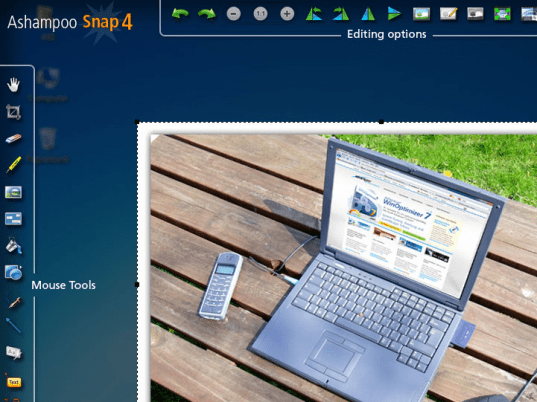
Ashampoo Snap 4 opens with a vivid looking interface with the chief editing options placed at the top and the rest of the options arranged intuitively on both sides and the main screen displaying the color tools for any enhancement or modification. The program would facilitate in creating high quality screenshots and video of the screen content and enable to edit and share the results with other users as well. It provides some nice creative features and improvements in the field of editing and coloring. With this tool, the user can make effective and individually created screenshots of desktop, selective areas or of complete websites; which makes it a must have for student fraternity as well. It can also help in creating videos and demos and facilitates saving them as high quality video files or even use them as presentations.
To conclude, Ashampoo Snap 4 proves to be a suitable option for creating screenshots and a demo based on the shots and hence gets a rating score of three points for its enhanced performance and functioning.
User comments