


Editor's review
Auto Screenshot Maker is a program useful to take screenshots for entire screen, active window and selection. The application stays in your system tray after installation. This program gives flexibility to take screenshot and simplify process to get screen capture. It captures a series of screens automatically and also removes duplicate screen.
Features: As a professional, you need to take screenshots several times in your daily work. To take screenshot, you need to follow numerous steps like press print screen, open image editor and then save on the hard disc. Using Auto Screenshot maker program you can take screenshot in a single step.
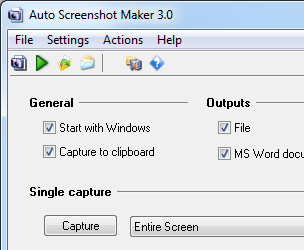
The application allows you to set preferences for your screenshots. It has three tabs namely General, Output and Hotkey. In General tab you can perform settings for single capture and auto capture. In auto capture mode select capture type from the supported list as entire screen or active window, set time interval in second for screen capture. With remove duplicates option, you can set parameters as acceptable area count and acceptable area size to identify. You can also set open the latest capture option and define the path to open the captured file. With output option you can set path to save captured file, define prefixed for file, define file type as JPEG, BMP and PNG. You can also capture images in MS word document. Define hotkeys for capture entire screen, capture active window, capture selection, open the last capture and email the latest capture. Once all the settings are done, you can perform the action as capture, start auto capture, email latest capture etc.
Overall: This is a good utility to take screen capture of your screen, application or windows.
User comments