


Editor's review
Capture screens, windows and rectangular areas. Also capture items in a variety of shapes, including diamonds, triangles, stars, and more. Optionally place borders around the shapes and choose a masking color for the exterior of the shape.
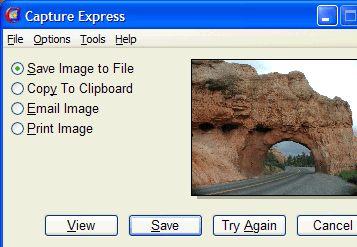
Pros: This application is a flexible screen capture program. When capturing an image you could switch between a stretch mode and move mode by right clicking the mouse. That helps you get the alignment right without aborting the capture cycle. With many other programs you may have to start over to get the alignment right. The manual capture process is a two step procedure. In the first step you define what to capture and then capture it. In the second step you determine what to do with the captured image. The Automatic Capture is a single step process. Pre-configuring what to capture and what to do with the image beforehand, results in a captured image with just a single key stroke. You can start the capture process by pressing a hot key such as F11 or clicking on the icon in the system tray. At the beginning of the Manual Capture process you are given choices of what to capture such as the Screen, all or part of a Window, a Rectangular area or a Shape. Once you have determined what to capture, click on the Capture button to begin. When capturing rectangular or other shapes, move your mouse to the location where you want to start and click the left mouse button. Move the mouse to define the shape and left click again to finish. If necessary, right click the mouse to adjust the location where the capture will occur. Once you have captured an image you need to decide what to do with it. You can save it to a file in BMP, JPG, PNG, or TIF file formats. Once captured you can copy the image to the clipboard, email it, print it, view it, or discard it by clicking the Cancel button.
Cons: Ability to define a truly irregular area would have been a useful addition.
Overall: The features are nice, are easy to use too. The overall package is rated at 4 stars.
User comments