


Editor's review
When away from home, do you often worry what your kids might be doing on their PC or the Internet? Apart from the parents, the employers also want to keep track of the employee activities on the official PC. Here comes the Desktop Adviser that allows them to keep a tab of activities on their PC. It takes regular screen shots of the applications that had been running on the system.
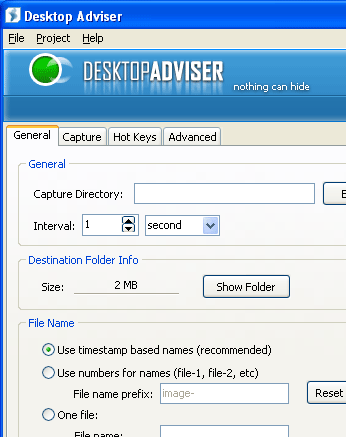
The Desktop Adviser software does the work efficiently and the downloading and installing also completes taking not much of your time. The first appearance of the program is very pleasant with settings for making changes so that the program could function well and according to your requirements. You need to select the Capture Directory for where the program would store the pictures after capturing screen. For taking the pictures of frequently you can set the time interval for capturing the pictures. While the shots are being taken they need to be specified with some name, select the timestamp or set a prefix to be set with the numbers for naming the captured files. Also if you don’t want to have these you can set one file name. You can decide the format in which you want to capture and you can set it to be images or videos as well. Now comes the turns to decide the level of the image quality along with the format to be JPG, WMF, or BMP. Select to capture the full screen or windows according to what is suitable to your requirements. Even you can set to have the hotkeys for the various options for performing the functions. For making it secretive you can have it to be password protected. Have the option set for the start up of the program and you can enable the output option also. ‘Start Capture’ and it will take the shots of the screen at the set interval and let you be well informed.
The software Desktop Adviser 5.4 would keep a constant watch on what had been running on your PC and keeps a record of all the information. It has been given a deserving 4 point rating for its useful features such a simple working and option selection that do not require any skills on the part of the user.
User comments