


Publisher's description
ImTOO Video to Picture for Mac is multifunctional picture capture software to batch extract pictures from various video formats, and save as static pictures, GIF animation, Flash, or HTML.
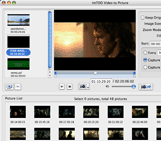
With the flexible capture mode, you can batch capture or take single snapshot of pictures automatically or manually. This software provides a picture list for you to preview the captured pictures, which allows you to extract images by frames more accurately.
*Key Features*
1. Flexible batch capture mode - Extract pictures at intervals of given time, and capture pictures averagely or randomly;
2. Capture frames manually - You can take snapshots when playing the video.
3. Capture frames from any segments or multiple videos - You can set the start time and end time of the video to choose any segment for batch capture, or add several videos simultaneously, batch capture pictures for each video, and list pictures from different videos respectively in the picture list;
4. Built-in video player - It provides a player for you to preview the video, from which you want to capture frames;
5. Preview pictures and choose the exact one by frames;
6. Optional output mode - In preview window, you can output pictures captured from different videos respectively, or check all needed pictures from different videos and output them as one animation file or HTML page;
7. Customize video size - Choose an appropriate zoom mode to customize the output picture/flash size, and fill the selected color to prevent it from distorting;
8. Excellent picture quality
ImTOO Software Studio is one of the pioneers in DVD, video and audio software development.We endeavor to develop most easy-to-use, steady and detail-focused software products.
With the flexible capture mode, you can batch capture or take single snapshot of pictures automatically or manually. This software provides a picture list for you to preview the captured pictures, which allows you to extract images by frames more accurately.
*Key Features*
1. Flexible batch capture mode - Extract pictures at intervals of given time, and capture pictures averagely or randomly;
2. Capture frames manually - You can take snapshots when playing the video.
3. Capture frames from any segments or multiple videos - You can set the start time and end time of the video to choose any segment for batch capture, or add several videos simultaneously, batch capture pictures for each video, and list pictures from different videos respectively in the picture list;
4. Built-in video player - It provides a player for you to preview the video, from which you want to capture frames;
5. Preview pictures and choose the exact one by frames;
6. Optional output mode - In preview window, you can output pictures captured from different videos respectively, or check all needed pictures from different videos and output them as one animation file or HTML page;
7. Customize video size - Choose an appropriate zoom mode to customize the output picture/flash size, and fill the selected color to prevent it from distorting;
8. Excellent picture quality
ImTOO Software Studio is one of the pioneers in DVD, video and audio software development.We endeavor to develop most easy-to-use, steady and detail-focused software products.
User comments