
 |
 |
|
|
 |
 |
 |
 |
|
|
Record your PC desktop screen activity to a AVI or WMV file. This advanced screen capturing tool can capture anything you see on the computer screen, including the entire desktop, windows, menus, cursors, and even video with sound.
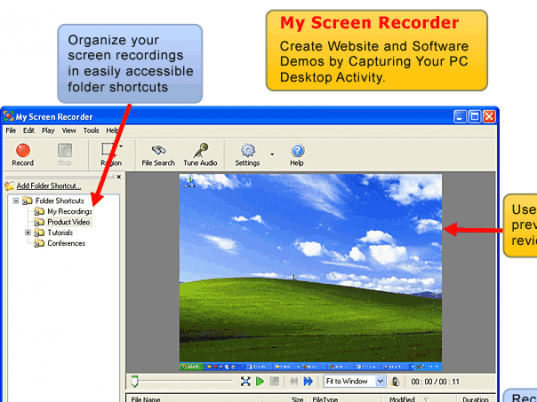
My Screen Recorder can capture the entire desktop, or only an area you select. You can use a connected microphone to add narration to your recordings, or have the program record the sounds the computer is playing. You can even record from the microphone and speakers at the same time! The built-in Preview feature lets you quickly review your movies.
My Screen Recorder also helps you organize your recordings into Folder Shortcuts for easy management. The program is easy to use. You can select from a framed area capture or full desktop recording. You can adjust the video quality settings to reduce file size, use custom cursors and more.
You can use My Screen Recorder to demonstrate features of a web site or program, make tutorials, or any other task that requires showing screen activity. It's the perfect way to record a webinar or video call, including audio. Create flawless recordings of Internet tv and radio shows effortlessly. Try My Screen Recorder risk-free today!
|
|
Editor review: Reviewer, 2007-12-25 08:51:00
My Screen Recorder 2.64 records PC desktop screen activity to an AVI file. This can capture everything on the computer screen, including the entire desktop, windows, menus, cursors, and even video with sound.
Pros: My Screen Recorder 2.64 records PC desktop screen activity to an AVI file. The activities that can be captured are the desktop, windows, menus, cursors, and even video with sound that may be playing at the time of capture.
My Screen Capture settings allow setting up of video, audio and keyboard parameters for optimal capture. You could tune up performance related parameters such as disable Windows graphic effects, “show window contents while dragging” or disabling screensaver etc. Before a screen capture session is started, it is best to get the settings done and do a test clip. Preview function will let you see this to ensure you have got all the settings right.
Audio can be captured through a microphone connected to the computer for commentary accompanying the video or one could record whatever the machine was playing during the screen capture; could be some background music.
My Screen Capture lets the screen capture be the whole of desktop or a region defined for the capture. Video recording parameters such as video quality, frame rates and key frame rates can be set to trade off quality with file size. Videos thus recorded can be organized into your personal files to make the management easy.
Cons: Nothing adverse noticed.
Overall: Quite an easy to use package, quite well organized and takes care of the settings very well. Overall rating is 4 stars.
|
 |
 |
Visit homepage of My Screen Recorder
Download My Screen Recorder 3.04
Popular search terms related to My Screen Recorder:
sound recorder, microphone, video capture, recorder, screen capture, movies, cursors, recording, file management, activity
|

record sounds on computer capture menus print entire screen desktop screen recording avi reduce desktop video recorder screen record screen capturing tools capture sound ogm to avi the easy way

Programs related to My Screen Recorder
|