
Free Downloads Center
e.g. River Past Screen Recorder 7.7.2

Latest Reviews

AlphaEZCam

AlphaEZCam
AlphaEZCam is a fully functional webcam application that has the capability to manage multiple cameras and upload images to web servers.

AirGrab WiFi Radar

AirGrab WiFi Radar
AirGrab WiFi Radar is a highly efficient tool for displaying and providing you access to the Apple Airport base stations and other WiFi wireless access points.

Subscribe

River Past Screen Recorder 7.7.2 Download

Editor's rating  
Users' rating   (6 votes) Rate it!
License Shareware / $39.95
Downloads 3207
Publisher River Past Corporation
File size 2121K
Date added 4-Jun-2008
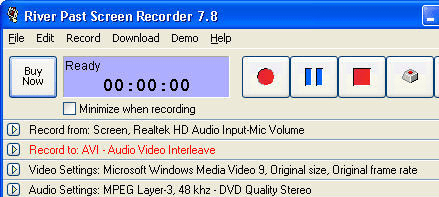
River Past Screen Recorder screenshot

Enlarge screenshot

Publisher's description
Editor's review
Submit your review

River Past Screen Recorder is a easy-to-use, fast, and powerful screen video recording software.

Record full screen, window (even if you drag it around the screen), fixed region, or cursor area. Output to AVI files, with choices of video codec with quality setting. It loads the video compressors dynamically on your system for the best power and flexibility. Common codecs include Cinepak, Indeo 3, 4, 5, Microsoft Video 1, Motion JPEG, DivX and XviD. Use the latter two for the best speed and quality.

Optionally audio can be recorded from any sources, including microphone, line-in, or speakers. Recording volume can be adjusted manually even during the recording. Full control over the audio codec, sample rate, channle, bits per sample, and bitrate.

It has a built-in scheduler for unattended recording. You can set the start time and/or the stop time. Record your e-learning sessions from the web or scheduled broadcasts when you cannot attend.

It has been tested to be up to four times faster than other programs. Ideal for making demo, tutorial, and training videos.

You can upgrade to River Past Screen Recorder Pro for additional output options - including DivX, XviD, WMV, MKV (Matroska) or OGM (OGG Media).

No adware or spyware. DirectX 8 required. Compatible with Windows Vista.

30 day MONEY BACK GUARANTEE

Editor review: Reviewer, 2008-05-21 09:18:00

While preparing the tutorials for any software or website site it is advisable to have a professional utility to help you in capturing the activity on the screen and convert it into a video format. This increases the effectiveness of the tutorial by a great degree and even your users can easily follow the instructions. If you also need any toll or software for any such purpose then try using River Past Screen Recorder Pro 7.7. With this software you can have the full screen, specific area or any particular window captured. When we are talking about capturing of a video one needs to give a thought to the selection of the format, video codecs, quality, and video compressors. The codecs include DivX, Cinepak, Microsoft Video 1, Indeo 3, 4, 5, Motion JPEG, and XviD. The program also supports recording of audio through line-in, microphone, speakers or any other source.

River Past Screen Recorder Pro 7.7 appears in front of the user with a very neatly designed screen that even a novice would find it easy to use. The program screen shows the options to have the recording started and stopped when required. While you go on with capturing the video you can set the program to be minimized if you do not want it into come into the view. To start capturing the video you require making few selections that are shown on the bottom of the program screen. Choose the capturing area to be Windows, full screen, or the defined area on the screen, set the maximum speed, etc. Make the selection of the format that you want to save the recorded file into. The format supported by the program are 3GPP2, 3GP, AVI, Windows Bitmap, DivX, Animated GIF, JPEG, Matroska, QuickTime, MPEG-4, MPEG-1, MPEG-2, OGG, RealMedia, WMV, and XVID. Change the video and audio settings for the Compressors, Quality, Sample Rate, Channel and Bitrate. Then finally you require making the selection of the Hotkeys to start and stop the recording without opening the program again and again.

Capture as many video as you want and create demo, training and tutorial videos with the help of River Past Screen Recorder Pro 7.7. The software has been given the rating point of 3.5 for its convenient to use features and for the fact that it performs the work in quick time while maintaining the quality.

Visit homepage of River Past Screen Recorder

Download River Past Screen Recorder 7.7.2


mkv video codec
river fast
divx ogm
xvid codecs
river past
matroska video
m4a audio codec
codec for wmv files
quicktime avi codec
divx full

Programs related to River Past Screen Recorder

Copyright © 2001-2009, Free Downloads Center.