
Free Downloads Center
e.g. Screen Grab Pro Deluxe 1.3

Latest Reviews

Vitascene Starterkit

Vitascene Starterkit
Vitascene Starterkit is a professional tool that allows to manage and enhance the effects and transitions of images.

eCover Engineer

eCover Engineer
eCover Engineer, the professional tool that allows you to create outstanding eBook covers, CD covers, DVD covers and software box covers.

Subscribe

Screen Grab Pro Deluxe 1.3 Download

Editor's rating  
Users' rating   (2 votes) Rate it!
License Shareware / $10.00
Downloads 1355
Publisher Traction Software
File size 2804K
Date added 3-Jul-2009
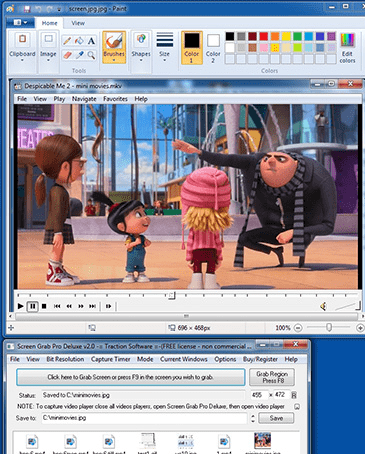
Screen Grab Pro Deluxe screenshot

Enlarge screenshot

Publisher's description
Editor's review
Submit your review

Screen Grab Pro Deluxe features One click grab of any screen for ease of use, timer operation, current window selection list.

Screen Grab Pro Deluxe supports full window or window region screen capture to file and/or clipboard ready for pasting in your favorite Picture Editor, capture of video windows is now possible, BMP, JPG, GIF, ICO & PDF save support, JPG compression options, change capture scaling, mouse pointer capture support, save with scaling options, auto save filenames with directory path, temp path and file naming support for e.g. date, time filename output.
Minimizes to task tray for quick capture, includes balloon tray info support, one key / mouse click capture & configure your own capture shortcut keys.

Editor review: Reviewer, 2009-09-21 08:12:00

Screen Grab Pro is a shareware screen capture tool. It features one click grab of any screen for ease of use, Timer operation, Current window selection list and more. Screen Grab Pro copies a bitmap to clipboard ready for pasting.

Features: You can capture the full screen or active windows or some specified regions on the screen. Capture can in full 32 bit color or just 256, you choose. For ease of use you can have timer based captures or current window list. If you want you can capture the mouse pointer on-screen. If you want you can capture video windows as overlays as well. Capture can be initiated by keypress and the key to be recognized for the capture can be set by user. Capture screens can be in MMP, JPG, GIF, TIFF, ICO or PDF formats.

Screen captures can also be exported via the clipboard and Windows 95, 98, ME, NT 4, 2000, XP, 2003, 2008 and Vista support means that you can export these captures to most applications.JPG compression options are available. Picture scaling and screen capture scaling are supported. File naming options let you automatically name the files for automatic capture into the named output file. Minimizes to task tray for quick capture, includes balloon tray info support, one key / mouse click capture. Print last capture feature is supported.

Overall: Ability to capture a few frames automatically would have added to the value, thus creating the ability to make videos of screenshot sequences.

Visit homepage of Screen Grab Pro Deluxe

Download Screen Grab Pro Deluxe 1.3


capture picture from video file
gif picture editor
how to capture picture from video
video capture screen
screen video capture
screen capture video
screen capture to video
screen and video capture
how to capture video on screen
capture screen to video

Programs related to Screen Grab Pro Deluxe

Copyright © 2001-2009, Free Downloads Center.