


Editor's review
Do you often need to face troubles while playing the video you’ve downloaded from the web? This is perhaps because these files usually are downloaded in flash (SWF) format, which require installing new multimedia player supporting the format. However, instead of going through the hassles of changing your default player application, you can try out an expertise solution in the form of Flash to Video Encoder PRO 5.0.4 utility. The program allows converting your swf videos into videos with different known formats, for making them compatible not only your PC but several multimedia devices. The supported output video formats consist of MPEG, AVI, ASF, WMV, and DVD files. In addition to these, the program offers functions to aid you in inserting logos, watermarks, and copyright messages into the videos.
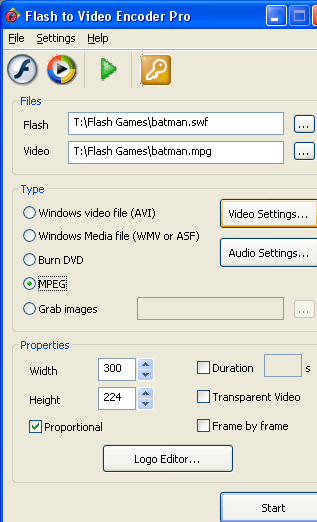
With the Flash to Video Encoder PRO 5.0.4 integrating user-friendly interface and simple features you can effortlessly perform the flash video conversion. Commencing the process, you’d have to select the Flash file for conversion and further choose the output video location. Moving on, you’d require setting the Type of video format for the output file as Windows video file (AVI), Windows Media file (WMV or ASF), MPEG, Burn DVD, or choose to Grab images from the video. Along with these, it even offers features to modify Video Settings and Audio Settings for deriving the desired results. Furthermore, it presents ‘Properties’ to set the Width and Height with features like Duration, Transparent Video, Frame by Frame, and Proportional options, which can be marked as per your preferences. The utility also comprises of ‘Logo Editor’, using which you can select a logo; set its position; and set transparent color. When you’re through with the features selection, click ‘Start’ button to begin the flash video conversion task.
Flash to Video Encoder PRO application supports converting your flash SWF video file into videos with common formats ensuring their smooth playback in different devices. Since the utility comes with an easily negotiable and reliable feature-set, the program has deservingly been rated with 4 points.

Why bother putting something like this available - it is not even worth downloading, and puts junk in the converted video besides?!