
Free Downloads Center
e.g. Boilsoft Video Splitter 6.34.4 Editor review

Latest Reviews

LightMan Extractor

LightMan Extractor
LightMan Extractor is a simple and handy tool to rip and convert your favorite audio files without incurring loss in quality of the sound.

Namosofts Data Recovery 2

Namosofts Data Recovery 2
Namosofts Data Recovery 2, the safe and reliable tool useful for the recovery of your lost, deleted or formatted data.

Subscribe

Boilsoft Video Splitter 6.34.4

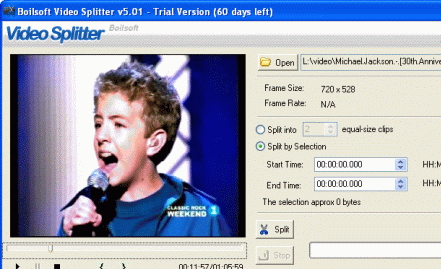
Editor's rating   Boilsoft Video Splitter screenshot

enlarge screenshot

Users' rating   (1 votes) Rate it!
License Shareware / $34.95
Downloads this week 237
Publisher boilsoft
File size 10516K
Date added 24-May-2012
Publisher's description
Editor's review
Submit your review

Reviewer, 2010-01-25 11:17:00

/p>The Boilsoft Video Splitter utility helps you to split, trim your video file into small size as per your choice and requirement. The application supports two splitting mode split into equal size clip and split by selection. This is a standalone application and works on Windows 98, Windows 2000, Windows ME, Windows XP, Windows 2003, Windows Vista and Windows 7 operating systems.

Features: Most of the time you are interested in a part of movie or video, so you need to split / cut / trim and extract the required part of video. Using Boilsoft Video Splitter program you can perform these operations. The application supports popular video formats to split such as AVI, MPEG, RM, ASF, WMV, 3GP and MP4. After splitting you can save the cut video files in AVI format.

The application interface is nice and simple. You can perform all the operations from the single user screen. Open the video file from which you would like to cut / trim video clips or files. You can see the frame size and frame rate on the screen. You can split your video file by two ways like split the files in specified number of equal size or split by selection. You can select start using the slide bar, drag slide bar to start position and select start then drag slide bar to end and select end. You can also set start time and end time by specifying time in HH:MM:SS:sss. Click on split button, it will open a dialog box to specify folder name where to store the split file or clip. The performance of application is good.

Overall: This is a nice program to split video file to make small size video files.

Visit homepage of Boilsoft Video Splitter

Download Boilsoft Video Splitter 6.34.4

Software related to Boilsoft Video Splitter

Copyright © 2001-2008, Free Downloads Center.