
Free Downloads Center
e.g. Fast video indexer 1.05

Latest Reviews

Spryka ePostMailer

Spryka ePostMailer
Spryka ePostMailer is a highly effective and free to use mass email marketing program and bulk email sender.

Multiformat File Searcher

Multiformat File Searcher
Multiformat File Searcher, will simplify and allows you to get control over your text search job within any document.

Subscribe

Fast video indexer 1.05 Download

Editor's rating  
Users' rating   (0 votes) Rate it!
License Shareware / $34.50
Downloads 906
Publisher Inzomia
File size 2423K
Date added 11-Feb-2008
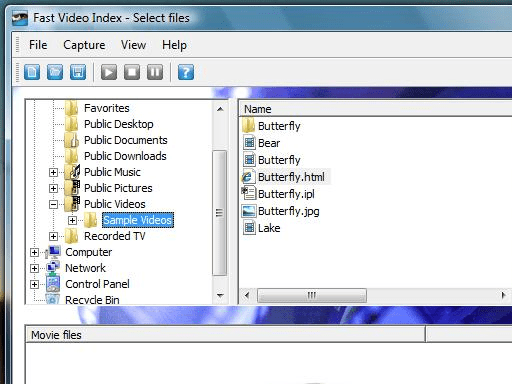
Fast video indexer screenshot

Enlarge screenshot

Publisher's description
Editor's review
Submit your review

Capture video frames from all your movie files with ease.
Fast video indexer grabs screenshots from a list of video files. The captured screenshots can be saved as several jpeg images or be combined into one large jpeg collection image. Fast video indexer can also generate html pages presenting your videos with the captured screens giving you a quick preview of an entire video in an instant. XML files with info about the captured videos and the video frames can be saved and used as image playlists in the Inzomia image viewer or by any program that can handle xml. You can organize your video collection in projects and go back later to add more videos to the collection. From the project you can generate an brief html summary report of all captured videos in the collection.

The Fast video indexer program uses the same video decoder as windows media player, if you can view the video in windows media player Fast video indexer supports the format. All output generated by Fast video indexer can be customized by editing xslt templates.

Editor review: Reviewer, 2007-09-21 07:44:00

Imagine taking the finest screen shots from the videos that you’re watching. Fast video indexer does this work for you and let you get some really amazing shots. The step- by step process is easy to execute and functions are also trouble free to use.

The software gives a very pleasant appearance and has vibrant colors on its start screen. You can download and install the software with few clicks. It will take a step by step process to extract the screen shots from the selected video. Select the folder containing the videos and the list of the videos in the middle screen. Choose the one you want to extract the shots from and the selection appears in the box below. Click ‘Next’ and you’ll get the shots from the video extracted. The next screen shows the video name and the extracting process. Then click on ‘Next’ and the details are shown with movie files, length, images, width, etc. At any time you can use to the ‘Back’ option for going to the previous stage. You can also have the videos being played by the given options on the screen. The extracted images are saved to the destination in a folder. You can choose the ones you want and delete those not required by you. It enables you to have the finest shots from the video. You can choose to enable and disable the toolbar and the status bar. There’s also a setting option given for you to make the selection according to you. You can set the start time and save time. You can enable the extraction to movie folder or a select one by your choice. You can also select the destination folder for the play list, web page and index photo generation. Software also supports a help guide that lets you to know about all the functions of the program.

The software is useful for even wedding photo album makers as they need not to captures the pictures separately. The 4 ratings that is receives from us is suitable on account of its smooth and fast working features.

Visit homepage of Fast video indexer

Download Fast video indexer 1.05


windows video player
video list
fast jpeg library
image collection
video extract
capture frames video
movie from jpeg
asx video format
compact video files
video converter to image

Programs related to Fast video indexer

Copyright © 2001-2009, Free Downloads Center.