

Free Downloads Center
e.g. ImTOO FLV Converter 5.1.22.0310

Latest Reviews

StatPlus 2009

StatPlus 2009
StatPlus 2009, comprises a suite of statistic tools and graphical analysis methods in a simplified interface.

Accord CD Ripper Express

Accord CD Ripper Express
Accord CD Ripper Express is a free to use tool with the capabilities to Rip and grab audio files from CD or DVD to WAV or MP3 formats.

Subscribe

ImTOO FLV Converter 5.1.22.0310 Download

Editor's rating  
Users' rating   (1 votes) Rate it!
License Shareware / $29.95
Downloads 5359
Publisher Xuesong Huang
File size 15471K
Date added 16-Mar-2009
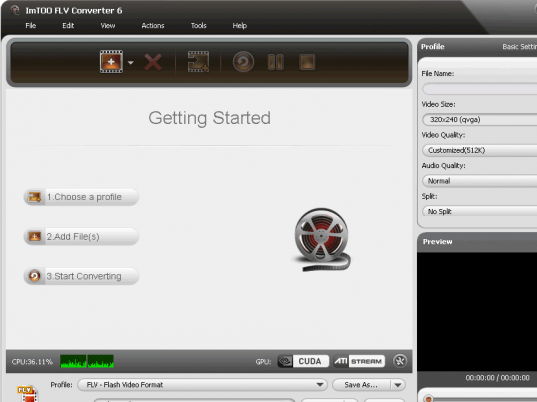
ImTOO FLV Converter screenshot

Enlarge screenshot

Publisher's description
Editor's review
Submit your review

ImTOO FLV Converter is a powerful and easy-to-use video to FLV/SWF converter/encoder. It can convert almost all popular video formats like DivX, Xvid, WMV, 3GP, 3G2, MPG, MPEG, MP4, MPEG-4 AVC, M4V, ASF, RM, RMVB, MOV, SVCD, VCD, VOB, and AVI to FLV streaming video and to SWF movie formats that are ready for the web publishing and streaming.

ImTOO FLV Converter can also convert audio formats to Flash Video (FLV and SWF) formats that only have audio. Almost all types of audio formats can be supported as the input files, such as MP2, MP3, M4A, AC3, AAC, RA, WMA, OGG, APE, CUE and audio CD.

Features:
1. Control the number of processed cores at any time during conversion.
2. CBR/VBR output format can be selected freely for certain profiles.
3. Volume control is supported.
4. Super fast speed and excellent output quality are provided.
5. Video Bitrate, Audio Bitrate, Frame rate, Video Size, Duration, and other parameters can be set before conversion.
6. Two modes provided: the Wizard Mode guiding the whole conversion process for you and the Advanced Mode with variable settings that you can set at will.
7. A shortcut of the software can be found directly on the desktop after the default installation.
8. In version 5.0 it supports creating a video from pictures and capturing multiple pictures from videos.
9. Provide advanced settings for meeting various users' demand. For example, you can customize the size of output file and its Bitrate will be calculated automatically.
10. In addition to abundant corresponding profiles for your digital devices, the FLV video converter also supports setting several profiles for the same video.
11. Support running in background and lower the priority automatically.

ImTOO Software Studio is one of the pioneers in DVD, video and audio software development. We endeavor to develop most easy-to-use, steady and detail-focused software products.

Editor review: Reviewer, 2007-11-07 09:14:00

Think of all those videos that you often see at the various websites, aren’t they great to view? You can have them too, not by downloading but you can turn your media files into flash files. Now if the question that arises in yr mind is ‘how?’ then ImTOO FLV Converter 3.1.43.1018b might be the right answer for you. It will let you convert your media files with different formats to the flash file format.

For making your flash files you can you just need to have the software downloaded from the site and get it installed in your system. When you get the software; launch it and start working immediately, it’s as simple as it sounds to be. After launching the appearance and the color of the program would let you feel relaxed while performing the work. Just add up the files that you want to convert to the files and make the selection specific by removing the ones not required by you. Clear the list for selecting a new one and you get the list of the selected files at the middle of the screen. You can even set the selection by marking or unmarking the files in the list. Choose the destination and also there are available other features like ‘Profile’, ‘Zoom’, ‘Split’, etc. ‘Edit’, ‘View’, ‘Tools’, etc options are also there at the menu bar for your conversion task. To check that whether you’re converting the right files you can have them played with the in-built player of the program. The general, audio and video aspects of the files are placed there on the right side of the program. You can easily have these flash files published at the websites and shared with your friends. There’s also assistance available through the help file option given with the program.

The software does the work efficiently and let you perform the task without any difficulty through the wizard or advanced mode. For the elegant performance and working it has been rated with 4 points.

Visit homepage of ImTOO FLV Converter

Download ImTOO FLV Converter 5.1.22.0310


flv editor
flv to divx
moyea flv
streaming video convert
codec for flv files
flv audio
mpeg to swf conversion
flv to xvid
imtoo wma
swf to 3gp converter

Programs related to ImTOO FLV Converter

Copyright © 2001-2009, Free Downloads Center.