
Free Downloads Center
e.g. ImTOO Video Converter Standard 5.1.26.0925

Latest Reviews

Ainvo Registry Defrag

Ainvo Registry Defrag
Ainvo Registry Defrag is a simple tool with the capability to keep your system working in a smooth and stable condition.

VintaSoftTwain.NET Library

VintaSoftTwain.NET Library
VintaSoftTwain.NET Library is a handy and useful .NET library with which you can control the working of scanners, cameras and any other TWAIN devices.

Subscribe

ImTOO Video Converter Standard 5.1.26.0925 Download

Editor's rating  
Users' rating   (1 votes) Rate it!
License Shareware / $35.95
Downloads 438
Publisher ImTOO Corporation
File size 15694K
Date added 29-Sep-2009
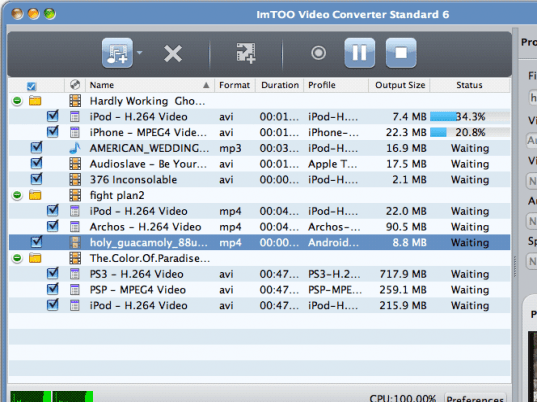
ImTOO Video Converter Standard screenshot

Enlarge screenshot

Publisher's description
Editor's review
Submit your review

With ImTOO Video Converter Standard, you can convert between almost all video formats including AVI, MPEG, WMV, DivX, MP4, MPEG-4 AVC, RM, MOV, XviD, 3GP, FLV, and even HD videos like H.264/MPEG-4 AVC, AVCHD (*.m2ts, *.mts), MKV, HD WMV, MPEG2/MPEG-4 TS HD video. It can also convert between audios like MP3, WMA, WAV, RA, and M4A, extract audio from video, convert pictures to video and capture pictures from videos. All the output media files can be played on iPod, iPhone, Apple TV, PSP, PS3, NDS, Wii, BlackBerry phone, iRiver, Creative Zen and other multimedia devices.

Key Functions
1. Convert between various video formats
2. Convert between HD video formats
3. Convert video to audio or extract audio from video
4. Convert between popular audio formats
5. Ceate videos from pictures, and capture images from videos
6. Work well with popular multimedia devices including iPod, iPhone, Apple TV, PSP, PS3, NDS, Wii, BlackBerry phone, iRiver, Creative Zen.

Key Features
1. Support dual-core or multi-core CPU for dealing with multiple conversion tasks with high speed.
2. Clear profile list classified by device type helps you quickly and easily find the profile you want.
3. Split one file into several.
4. Directly convert any parts of one video file.
5. Extactly get the output file size with Bitrate Calculator.
6. Run the software in the background to consume less resource.
7. Provide several after-done actions to release you from waiting the conversion to the end.
8. Take a snapshot of favorite movie images.
9. Preview the source file before converting and the output file with the built-in player.
10. Customize video and audio parameters including bit rate, frame rate, sample rate, channel, codec, resolution and quality.

Editor review: Reviewer, 2009-10-09 08:02:00

After buying your new state of the art multimedia mobile phone device, you must be preparing to transfer your favorite media files within it. But, while doing so you may confront troubles with your video files due to format incompatibility. It’s because majority audio files are present in mp3 format supported by almost all devices, but when it comes to videos, devices like mobile phone, iPod, etc support playback of specific formats. However, if you are facing such problem then an effective solution can be to convert the video files into compatible formats. And for performing this video format conversion task skillfully, you can take up the assistance of ImTOO Video Converter Standard 5.1.26.0925. The utility functions proficiently to convert videos within different video formats such as MPEG, H.264/MPEG-4 AVC, WMV, MPEG-4 AVC, DivX, AVI, along with MP4, HD WMV, FLV, RM, 3GP, and even more. Also, it allows you to extract audio from videos with RA, MP3, M4A, WAV, and WMA formats.

With the ImTOO Video Converter Standard application, firstly you’ve to choose the Profile for output format to get the video converted accordingly. Next, you can add different videos for processing as the program supports batch conversion of videos. The selected source videos can of different formats, and even you can assign each video a different output format. Further, the utility imparts option to mark various segments in a video to form several small clips, individually from each file. When you choose the profile, its relevant settings are provided over the right. Using these you can alter Name, Video Size, Video Quality, Audio Quality, Subtitle, and Split options to get desired output. In addition, you can also apply different effects by altering brightness, contrast, saturation, and other effects. Lastly, you’ve to define the destination directory to get the output files stored there. Now click the convert button placed over toolbar for beginning the conversion process.

ImTOO Video Converter Standard converts your videos within several formats to make them compatible with different players and portable devices. As the application imparts exclusive feature-range and delivers remarkable performance, it’s being rated with 4.5 points.

Visit homepage of ImTOO Video Converter Standard

Download ImTOO Video Converter Standard 5.1.26.0925


imtoo psp converter
imtoo psp video converter
codec for m4a
codec m4a
m4a codec
imtoo avi to mpeg
imtoo avi mpeg
imtoo mpeg converter
imtoo mp4
convert wav to mpeg2

Programs related to ImTOO Video Converter Standard

Copyright © 2001-2009, Free Downloads Center.