
 |
 |
|
|
 |
 |
 |
 |
|
|
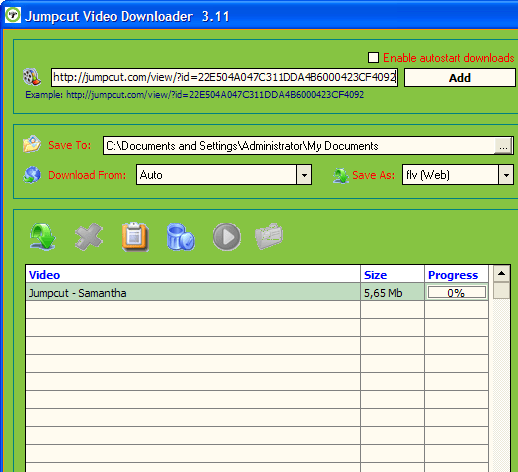
Download and save Jumpcut videos ( jumpcut.com ) to your PC, Ipod, Iphone, PSP, Mobile Phone with one-click. You don't need any players to play flash video just play it on the default media player classic. Save the downloaded video into various formats: .avi, .mpeg, .flv, .wmv. Download web videos to your PC, Ipod, PSP, Mobile. Just run Video Downloader and start downloading! Simply paste the URL of a video into the program, press Add, and the file will be downloaded into the selected folder. No extra codecs or players needed. No need to use scripts for web browsers.
|
|
Editor review: Reviewer, 2009-04-21 09:16:00
When it comes to naming an appealing website that can help users in sharing videos, the name Jumpcut automatically strikes the mind. The website gives an interactive platform to users for uploading, editing and sharing their videos with others. As the website is filled with a variety of interesting videos on it, you must be thinking to download few of them while browsing through the site. But, Jumpcut does not provide a video downloading option, which might be a bit disheartening to you. However, you need not get discouraged from this, as you can download all your favorite videos by taking the handy assistance of Jumpcut Video Downloader 3.14. Visit the website, run the utility and copy the URL of the video you’re watching or wish to download. The copied URL is automatically captured by the program, which you can add to the list for downloading the video. Not only downloading, but the program also supports direct download and conversion of video into the specified format.
The interface of the Jumpcut Video Downloader 3.14 opens with an impressive console, comprising of an uncomplicated feature-set. Watching your favorite video, you simply have to copy its URL that gets added to the program’s URL field. Pressing ‘Add’ button it gets included in the program’s download list, where its details and progress level is displayed. If you wish to see quick action then simply enable autostart downloads after setting the configurations. Coming to the settings, firstly you require selecting an output destination to store downloaded file with ‘Save To’ field. Setting this, the next option is ‘Download From’ that lets you select one from different supported websites for video downloading process, such as Jumpcut.com, Break.com, Youtube.com, Megavideo.com, Video.Google.com, Tangle.com, and different other websites. Next feature is Save As, which gives you access to the video format list to select one for video conversion task. To get better video quality you can enable downloading the video in high quality. Finally, the listed video can be downloaded manually or automatically as configured.
Jumpcut Video Downloader 3.14 offers incredible performance in downloading selected videos in the format specified by the users. The tool has deservingly been rated with 4 points for its remarkable performance as well as it powerful feature-set.
|
 |
 |
Visit homepage of Jumpcut Video Downloader
Download Jumpcut Video Downloader 3.14
Popular search terms related to Jumpcut Video Downloader:
avi players, codecs, flash player, downloader, wmv, mpeg player, avi player, video player, mobile, videos
|

flv codecs codecs for media player how to get flash player on your psp flash player for psp flash for psp save flash player codecs wmv psp phone ipod play psp flv

Programs related to Jumpcut Video Downloader
Xilisoft Video Converter Ultimate for offers the best way to convert WMV, ASF, AVI, MPEG, 3GP, RM, MP4, etc. videos and WMA, MP3, OGG, AAC, AU, AC3, M...
Wondershare DVD to Flash Converter is a versatile yet easy-to-use program to turn your favorite DVD movies into smaller, easily distributable Flash fi...
Simple Blu-ray Video Authoring SDK
The Simple Blu-ray Video Authoring SDK (SBDAU) package is a simple software development kit for creating Blu-ray...
RER WMV Converter is outstanding WMV conversion software for you to convert almost any video format to WMV and convert WMV to all popular video/audio ...
StarBurn supports all types of optical storage media (including CD-R/RW, DVD-R/RW, DVD+R/RW, BD-R/RE, HD-DVD-R/RW StarBurn is a FREE powerful tool for...
Xilisoft iPhone Software Suite consists of four iPhone apps: DVD to iPhone Converter, iPhone Video Converter, iPhone Ringtone Maker and iPhone Transfe...
Free Screen To video allow you to record screen activity to video. Record Entire or parts of your screen to FLV, AVI, WMV or SWF. Very easy to use, Fr...
This is an almighty DVD copy designed to meet all your needs in copying CD/DVD to blank CD/DVD disc; burning video, ISO Image file and VIDEO_TS to DVD...
Bluefox iPod Video Converter is capable of converting many formats easily and rapidly with high quality.
As a fast and easy-using iPod MP4 movie co...
The Ask & Record Toolbar is a FREE, revolutionary new browser-based video/audio recording and conversion program that allows you to save and convert v...
|