


Editor's review
When it comes to naming an appealing website that can help users in sharing videos, the name Jumpcut automatically strikes the mind. The website gives an interactive platform to users for uploading, editing and sharing their videos with others. As the website is filled with a variety of interesting videos on it, you must be thinking to download few of them while browsing through the site. But, Jumpcut does not provide a video downloading option, which might be a bit disheartening to you. However, you need not get discouraged from this, as you can download all your favorite videos by taking the handy assistance of Jumpcut Video Downloader 3.14. Visit the website, run the utility and copy the URL of the video you’re watching or wish to download. The copied URL is automatically captured by the program, which you can add to the list for downloading the video. Not only downloading, but the program also supports direct download and conversion of video into the specified format.
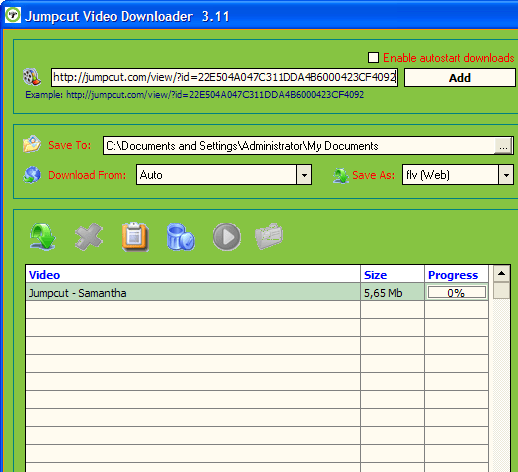
The interface of the Jumpcut Video Downloader 3.14 opens with an impressive console, comprising of an uncomplicated feature-set. Watching your favorite video, you simply have to copy its URL that gets added to the program’s URL field. Pressing ‘Add’ button it gets included in the program’s download list, where its details and progress level is displayed. If you wish to see quick action then simply enable autostart downloads after setting the configurations. Coming to the settings, firstly you require selecting an output destination to store downloaded file with ‘Save To’ field. Setting this, the next option is ‘Download From’ that lets you select one from different supported websites for video downloading process, such as Jumpcut.com, Break.com, Youtube.com, Megavideo.com, Video.Google.com, Tangle.com, and different other websites. Next feature is Save As, which gives you access to the video format list to select one for video conversion task. To get better video quality you can enable downloading the video in high quality. Finally, the listed video can be downloaded manually or automatically as configured.
Jumpcut Video Downloader 3.14 offers incredible performance in downloading selected videos in the format specified by the users. The tool has deservingly been rated with 4 points for its remarkable performance as well as it powerful feature-set.
User comments