

 |
 |
|
|
| Editor's rating |
|
| Users' rating |
(1 votes) Rate it! |
| License |
Shareware / $39.99 |
| Downloads |
13892 |
| Publisher |
MOVAVI |
| File size |
71991K |
| Date added |
19-Oct-2009 |
|
|
Enlarge screenshot |
|
 |
 |
 |
 |
|
|
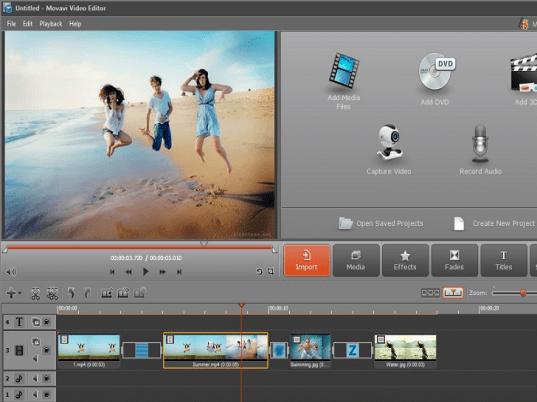
Movavi Video Editor is an effective yet easy-to-operate program for video editing and quality improvement.
Key Features:
1. Separate video, audio, and title tracks of the timeline panel:
- Separate tracks for videos & images, audio, and titles.
- Support for up to 100 tracks on the timeline.
- "Solo" & "Mute" track modes for convenient editing.
- Customizable text titles: you can change font color, size, style, and alignment, set title animation style, transparency, speed, and duration of movement.
- New convenient time bar showing the exact time of any video fragment of your project.
2. Wide range of supported formats and unique input media sources:
- Video Formats: AVI (including DivX, XviD, MJPEG, and other codecs), DV AVI, MPEG 1,2, MP4 (including H.263, H.264, and other codecs), Windows Media Video (WMV, ASF), 3GP (3GPP, 3GPP2), QuickTime (MOV, QT), DVD (VOB, IFO), MOD, DAT (VCD, SVCD), M2T, MTS, MKV, VRO, Flash (FLV).
- Audio Formats: MP3, WAV, WMA, OGG, AAC.
- Image Formats: BMP, GIF, JPEG, PNG.
- Use all available video and audio capturing devices.
- Download online video from YouTube and other video-sharing websites and use it in your project
3. Stunning visual effects & transitions:
- More than 20 automatic and customizable filters to take care of diverse video quality problems.
- Customizable video filters let you define the desired level and parameters of the improvements you introduce.
- Amazing selection of video effects will liven up your video and give it a professional feel.
- Stunning transitions to make separate episodes link smoothly to one another.
- More than dozen stylish transitions to insert between video clips.
- Customizable transition settings.
- Background project rendering.
4. Multiple ways to share your video creations:
- Save video in any popular format.
- Transfer your video project to a portable device of your choice.
- Burn the edited video to a CD or DVD.
|
|
Editor review: Reviewer, 2009-03-31 04:40:00
At times while watching your favorite movies, a thought of extracting the clips from your favorite scenes from the movie must have struck your mind. However, sometimes even the quality of the video you are watching is not up to the mark at all that eventually spoils you viewing experience. Considering various such situations you often try seeking a proficient application for editing the videos as per your requirement. In such case, Movavi Video Editor 4.0.2 can be a perfect assistant for carrying out the video editing tasks. The software facilitates you to perform various other functions such as separate audio, video, sound effects, customize text titles, transitions, and various other visual effects. It’s compatible of functioning with variety of video formats such as AVI, DV, MPEG, 3GP, MOV, MOD, M2T along with MKV, MP3, WAV, OGG and other commonly used image formats.
On launching the Movavi Video Editor 4.0.2, you’re shown Import tab with Open Media File, Capture Video, Record Audio, and Capture Screenshot features. Press ‘Open Media File’ or drag and drop the video files, or images for creating slideshow, into the program, which get queued at storyboard area. After adding files opens the ‘Edit’ tab providing Media, Effects, Transitions, and Titles options to work with. The utility allows adding multiple videos and images, to which different Effects filters like AutoFilter, Brightness, and Contrast can be added, and also these filters can be customized to your requirement. Moving further, you can add Transitions to videos for adding them to create a new video, and to the images to form a slideshow. With the last ‘Titles’ tab new customized Titles can be added and positioned on the created/edited video. The loaded/created files can be previewed and played with built-in player that also accompanies features to crop video to desired extent, view in full screen, and capture image of current frame. Finally you can store the output file as video file, for mobile device, or burn to CD/DVD.
Movavi Video Editor 4.0.2 can resolve your problem of finding an uncomplicated and effective video editor, along with enabling you to create a new video by inserting images, music, transitions, and add different videos into one. The utility is customized in a manner as to be conveniently operable by all its users and helps in deriving a commendable output, in consideration to which it deserves to be assigned with 4/5 rating points.
|
 |
 |
Visit homepage of Movavi Video Editor
Download Movavi Video Editor 5.0.3
Popular search terms related to Movavi Video Editor:
cut to size, codecs, mpeg editor, improvement, self improvement, quicktime, video editor, video editing, wmv, vcd
|

vro files flv to 3gpp mod dvd vro to avi ifo to 3gpp join dat codecs for mkv vro to vob codecs 3gpp vro to dvd

Programs related to Movavi Video Editor
Xilisoft Video Converter Ultimate for offers the best way to convert WMV, ASF, AVI, MPEG, 3GP, RM, MP4, etc. videos and WMA, MP3, OGG, AAC, AU, AC3, M...
Wondershare DVD to Flash Converter is a versatile yet easy-to-use program to turn your favorite DVD movies into smaller, easily distributable Flash fi...
Fake Voice is a voice changer software that helps you change your voice to male, female, old, young, teen, hard, robot, shrill, or some one totally ne...
RER WMV Converter is outstanding WMV conversion software for you to convert almost any video format to WMV and convert WMV to all popular video/audio ...
StarBurn supports all types of optical storage media (including CD-R/RW, DVD-R/RW, DVD+R/RW, BD-R/RE, HD-DVD-R/RW StarBurn is a FREE powerful tool for...
Xilisoft iPhone Software Suite consists of four iPhone apps: DVD to iPhone Converter, iPhone Video Converter, iPhone Ringtone Maker and iPhone Transfe...
Free Screen To video allow you to record screen activity to video. Record Entire or parts of your screen to FLV, AVI, WMV or SWF. Very easy to use, Fr...
This is an almighty DVD copy designed to meet all your needs in copying CD/DVD to blank CD/DVD disc; burning video, ISO Image file and VIDEO_TS to DVD...
Bluefox iPod Video Converter is capable of converting many formats easily and rapidly with high quality.
As a fast and easy-using iPod MP4 movie co...
The Ask & Record Toolbar is a FREE, revolutionary new browser-based video/audio recording and conversion program that allows you to save and convert v...
|