
Free Downloads Center
e.g. SplitMovie 2.1.17

Latest Reviews

File Backup Watcher Professional

File Backup Watcher Professional
File Backup Watcher Professional, the professional tool that makes you ready to face any situations by making handy backups of your vital data.

Registry Flashlight Fixer

Registry Flashlight Fixer
Registry Flashlight Fixer is a simple and handy registry booster that can also control hidden Microsoft Windows operation system settings.

Subscribe

SplitMovie 2.1.17 Download

Editor's rating  
Users' rating   (2 votes) Rate it!
License Shareware / $29.95
Downloads 7528
Publisher MOVAVI
File size 12356K
Date added 21-Sep-2009
SplitMovie screenshot

Enlarge screenshot

Publisher's description
Editor's review
Submit your review

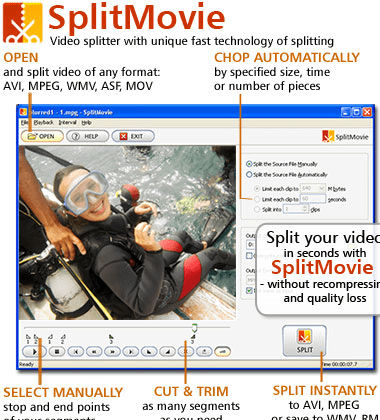
MOVAVI SplitMovie is a simple and fast video trimming and splitting software which cuts video files into fragments, enabling you to save your favorite episodes or split a large file for burning the fragments on CDs. With SplitMovie, you can split/cut/trim your video automatically by size, time or number of pieces and manually by selecting the beginning and ending points of the needed segments. SplitMovie uses the unique splitting technology of saving AVI and MPEG without recompression and quality loss for the fastest result. It supports all popular video formats: AVI, MPG, MP4, MOV, WMV, ASF, IFO (DVD), VOB (DVD), 3GPP, 3GPP2, DAT (Video CD) as Input Formats and AVI, MPEG, RM, WMV as Output Formats.

Features:

1. Supported formats:
SplitMovie works with all popular video formats.
You can open and split/cut/trim the following types of files: AVI, MPG, MP4, MOV, WMV, ASF, IFO (DVD), VOB (DVD), 3GPP, 3GPP2, DAT (Video CD) formats. Your video fragments can be saved in AVI, MPEG, RM or WMV formats.

2. Fast splitting:
SplitMovie uses the unique splitting technology when splitting AVI file to AVI segments or MPEG file to MPEG segments without recompression and quality loss. This allows to speed up the splitting process in at least 5 times!

3. Automatic split:
Automatic split mode cuts fragments depending on the specified size, time and number of parts.

4. Manual split:
Manual split mode allows selecting beginning and end of fragments and output format. You can select as many fragments as you want at once, including the intersecting fragments!

5. Preview:
You can view and playback your video files directly in the program using the large preview window. This allows you to select the exact frames for the segments.

6. Intuitive and simple interface:
You don't have to figure out the purpose of many different buttons. SplitMovie features a simple interface of 3 buttons that is clear to everyone.

Editor review: Reviewer, 2008-09-15 08:10:00

Whenever we nee to share a important video with our colleagues, we generally intend to share some part of it, instead of the complete video. Thus, we look for a tool that can trim the videos as per our requirements, so as to present the most relevant part of the video. Just break your search and try using SplitMovie 2.1.4 for the purpose. The application offers easy splitting, trimming and cutting of videos as per user’s requirements. The application is capable to split and save the video, without compromising with the quality of the content and it supports working with different types of video format files.

SplitMovie 2.1.4 is an easy to use application which makes it hassle free task for you to edit and form clips from your favorite videos. To start the process, you have to load a video file into the program with the help of ‘Open’ option. It supports importing different format video files such as MPG, AVI, MP4, WMV, ASF, IFO, VOB, 3GPP2, DAT, etc to MPEG, AVI, WMV, RM output formats. The video that you load with the program can be previewed with the help of player controls and the display screen provided the left side. The features to work with are placed at the right of the screen. To perform the splitting process automatically you need to set the size, time and number of clips. For the manual splitting you would have to set the beginning and ending point by yourself. Then select the output directory and the format for saving the output file. When you have made the selections you just have to click on Split button, and the program would start processing the video file to provide you the result as per specifications.

The SplitMovie 2.1.4 application includes easy trimming/splitting/cutting features to perform the task manually or automatically as preferred. For the efficacy it shows in video splitting and the simplified of feature operations, the software is rated with 3 points.

Visit homepage of SplitMovie

Download SplitMovie 2.1.17


avi trim
splitting wmv files
dat split
video trimming
convert ifo to mpg
cut dat file
mpeg splitting
xvid trim
cut vob to vob
3gpp avi converter

Programs related to SplitMovie

Copyright © 2001-2009, Free Downloads Center.