
Free Downloads Center
e.g. Video Userpic 1.6.6

Latest Reviews

Asterix and the Great Rescue

Asterix and the Great Rescue
Asterix and the Great Rescue is a fun and fanciful game suitable to all ages with an addictive game-play.

Proposalsmartz Proposal Writing Software

Proposalsmartz Proposal Writing Software
Proposalsmartz Proposal Writing Software is an handy application that allows you to work about smartly with your business proposals and documents.

Subscribe

Video Userpic 1.6.6 Download

Editor's rating  
Users' rating   (1 votes) Rate it!
License Shareware / $29.95
Downloads 3623
Publisher VisiFly
File size 10863K
Date added 21-Oct-2009
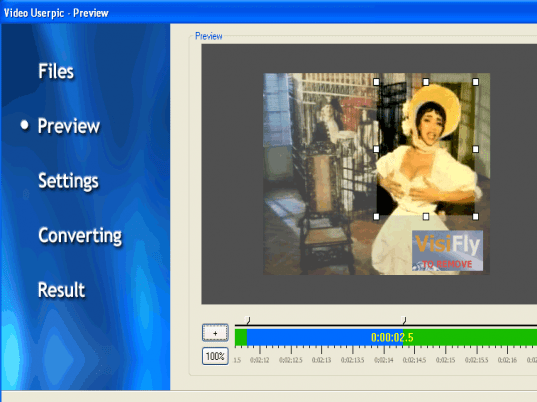
Video Userpic screenshot

Enlarge screenshot

Publisher's description
Editor's review
Submit your review

At the present time many internet users has accounts for personal blogs, virtual communities, forums, livejournals. People communicate throught the world wide web for business, interests, hobbies or just for chatting. Every user has a userpic. A userpic is a digital image which a user of a virtual community uses to represent themself. Users typically choose a self-portrait as their userpic to further develop their online identity. Since userpics may describe anything, they can also include personal artwork, photography, or symbols from pop culture. Along with unique usernames and questionnaire profiles, userpics are one of the most effective ways to personalize one's presence within an online social network. Many users manipulate their userpics before they publish them using a bitmap graphics editor. But none of graphics editors can handle a video.

But now everyone is able to create a Video Userpic! With a one single tool, such as Video UserPic.

Video UserPic is a wizard tool for creating video userpics from any digital video files with video crop function. After you choose the right folder of the video and input it, you will be shown some video and audio parameters of the particular video file. The output file, which is Animated GIF userpic will be automatically saved in the same folder with remark and GIF extension, so you will not loose your userpic. Then you click "Next" and wizard redirects you to the second step. You will see the preview of the video file with a range bar, that you can manage for creating a GIF file and a smaller frame for cropping. Video UserPic is a Wizard so everything is simple and stuctured. You won't have to read a long complicated 'help' before you can start!

Editor review: Reviewer, 2008-04-29 11:29:00

After joining various blogs, social network sites, virtual communities, etc you customize your profile in order to represent your identity. While doing so you also keep changing your user pic by your own images and modified ones. But while making modifications have you ever thought of having a video clip placed as your userpic. You can do this with ease just give a try to Video Userpic 1.3d. It enables you to place the digital video with the help of the video cropping function. It has a user friendly Wizard style interface which takes care of tasks right from selection to final output. It can be done by easy selections of some audio and video parameters and save the output as Animated GIF.

Video Userpic 1.3d show the step by step process which one needs to complete to create their userpic customized to suit their profile. Starting with the first step, you can have the file selected that you want to create the animated GIF from and also set the audio and video parameters. Then you ‘Preview’ the video. While the preview is running, you can make the selection of the starting and ending point for the part of the video that you want to be cropped. Going to the ‘Next’ step you can have the Settings changed according to your preferences. Make the selection of the destination folder for the file to be saved. When you have selected the required fields then you start the process of conversion with the provided option. The software also contains the feature that enables you to set the frame and point the exact area that you want to have from the video. View the resulting File that you can easily place as userpic.

Video Userpic 1.3d helps you to create amazing video clips that can be utilized with your profile on website. Rated with 3.5 points the software is effective to be used and rather simple in its functioning that even a novice user can also operate it ease.

Visit homepage of Video Userpic

Download Video Userpic 1.6.6


video folder
virtual video
video to gif converter
video creating
video cut tool
video file cutter
audio crop
video editor vob
aplus video to xbox
video convert to mp4

Programs related to Video Userpic

Copyright © 2001-2009, Free Downloads Center.