


Publisher's description
Once we had a necessity to daily download certain files from ftp server. Our colleagues uploaded them to ftp, where files might have been updated several times a day. First, we downloaded files manually - you open ftp client, go to the necessary folder, look if there are necessary files and download them. The same procedure was repeated in an hour. If, of course, we did not forget to repeat it. J The most tolerant of us was doing it for a week, then he said "Stop. What if we will need to also upload files tomorrow? And what if there will me several servers? Let's create software, which will upload and download files automatically".
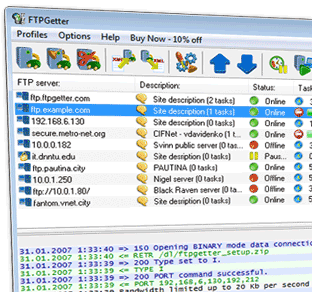
This is how FTPGetter appeared – a manager for automation of ftp upload and download tasks. If you periodically upload web site updates to ftp server, daily download web site logs, upload your webcam pictures, exchange files with other branches through corporate ftp server – then FTPGetter will help you automate execution of these tasks. You just need to create an ftp server profile: set up connection settings, create automation tasks for uploading or downloading files and folders, and customize the built-in scheduler, which will start execution of tasks. You do not need to write any scripts, though.
Unique feature of FTPGetter is group uploading and downloading of files by mask. You can, for example, upload only HTML files to the server. Or download images only in PNG format.
FTPGetter can upload and download not only groups of files but also subfolders of any nesting level with contained files. The folder structure is saved on the destination side.
FTPGetter can work with servers by common protocol, as well as by secure ftp (ftp over SSL). Connection through ftp proxy, SOCKS proxy and HTTP proxy (method CONNECT) is supported. Compare source and destination files by modification date/time, MD5 hash or size. Save time and network traffic - FTPGetter will upload or download only new or modified files.
This is how FTPGetter appeared – a manager for automation of ftp upload and download tasks. If you periodically upload web site updates to ftp server, daily download web site logs, upload your webcam pictures, exchange files with other branches through corporate ftp server – then FTPGetter will help you automate execution of these tasks. You just need to create an ftp server profile: set up connection settings, create automation tasks for uploading or downloading files and folders, and customize the built-in scheduler, which will start execution of tasks. You do not need to write any scripts, though.
Unique feature of FTPGetter is group uploading and downloading of files by mask. You can, for example, upload only HTML files to the server. Or download images only in PNG format.
FTPGetter can upload and download not only groups of files but also subfolders of any nesting level with contained files. The folder structure is saved on the destination side.
FTPGetter can work with servers by common protocol, as well as by secure ftp (ftp over SSL). Connection through ftp proxy, SOCKS proxy and HTTP proxy (method CONNECT) is supported. Compare source and destination files by modification date/time, MD5 hash or size. Save time and network traffic - FTPGetter will upload or download only new or modified files.
User comments