

 |
 |
|
|
 |
 |
 |
 |
|
|
WebCam Monitor turns your PC into a video surveillance system.
Use any camera with WebCam Monitor to detect an intrusion or other unusual activity. When an alarm condition is detected, the program can sound an audible alarm, or quietly send you an email with a photo. You can receive alerts on your cellular phone for 24-hour coverage. Automatically capture photographs, or record video and audio in highly compressed files. You can automatically upload your recordings to any FTP location for easy viewing or safe storage.
Set up WebCam Monitor in minutes, using a wizard to auto-configure the application for common monitoring and alert scenarios. WebCam Monitor supports USB, FireWire, and IP cameras, and many types of TV capture card. All settings, such as alerts, photo, and video recordings, or FTP uploading can be turned on and off using the built-in scheduler. All monitoring and alert events are logged with date and time stamps.
State of the art motion detection triggers alerts. You can adjust the sensitivity of the detection, and mask out areas of the camera view to avoid false alarms.
Broadcast a live video and audio stream over your local network or the Internet. Keep any eye and ear on your home or office from anywhere.
Over 100 camera models are supported with full pan / tilt and digital zoom controls when available. All of the settings can be customized, including the sensitivity of the motion and sound detection, the interval between photos, and the way that images are captured and transmitted. Download and try the most advanced PC video surveillance tool today.
|
|
Editor review: Reviewer, 2008-03-05 07:07:00
WebCam Monitor application turns a PC into a video surveillance system, that allows monitoring of the home/office from a remote location.
Pros: WebCam Monitor helps monitoring of the home or a office space through the webcam on the system to monitor any intrusion or an unusual activity. Motion detection as well as noise detection is possible with the system. When unusual situation is detected the system could send out a snapshot by e-mail or if you prefer a recording can be uploaded to a predefined location. If you need to a streaming video can be transmitted to a remote location too.
WebCam Monitor can be setup in minutes using a wizard to auto-configure the application for common monitoring and alert scenarios. Built in scheduler can be used to schedule all settings such as alerts, snap and video recordings, or FTP uploading. All monitoring and alert events are logged with date and time stamps.
A range of cameras are supported and pan/tilt/zoom can be controlled when these features are available in the cameras. All of the settings can be customized, including the sensitivity of the motion and sound detection, the interval between snapshots, and the way that images are captured and transmitted.
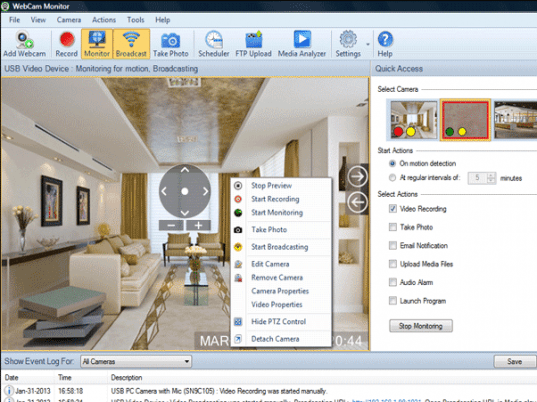
The interface is well designed and nicely laid out. Quick settings are on the right panel while a log window is provided at the bottom. This panel also includes a scheduler monitoring. Addition of the monitoring devices cameras and audio devices can be done through wizards. For calibration purposes alerts can be tested as required or on a schedule. Some areas of the scanned by cameras can be masked away from movement detection purposes.
Cons: Nothing adverse noticed.
Overall: On the average this application is a well designed and easy to use. Users need not spend much time in learning it either. Overall this package rates 4 stars.
|
 |
 |
Visit homepage of WebCam Monitor
Download WebCam Monitor 5.22
Popular search terms related to WebCam Monitor:
usb, surveillance, webcam, microphone, video capture, motion, ports, com ports, units, screen capture
|

video monitoring upload monitor alert monitor detect motion webcam multi webcam insert sound to video camera surveillance image capture webcam record videos with your webcam tool video

Programs related to WebCam Monitor
|